Recent investigations by cybersecurity researchers have unveiled a revitalized espionage campaign leveraging the LightSpy iOS spyware against users in South Asia. Notably advanced, this spyware, also known as ‘F_Warehouse,’ is designed to infiltrate iPhones with an array of spying functionalities. This campaign, extensively detailed in a report by the BlackBerry Threat Research and Intelligence Team, represents a significant threat, particularly to users in India, as indicated by VirusTotal submissions.
Origins and Evolution of LightSpy
Initially identified in 2020 by Trend Micro and Kaspersky, LightSpy is known for its sophisticated backdoor capabilities on iOS devices, usually spread through compromised news websites in watering hole attacks. The latest findings highlight the spyware’s modular architecture which enables the extraction of sensitive data such as contacts, SMS messages, location details, and even VoIP call recordings.
Linkages and Expanded Threat Capabilities
An October 2023 analysis by ThreatFabric revealed that LightSpy shares infrastructure and functionality with DragonEgg, an Android spyware attributed to the Chinese nation-state group APT41, also known as Winnti. The intricate nature of LightSpy allows it not only to gather traditional data but also to access files and data from popular applications like Telegram, QQ, and WeChat, alongside iCloud Keychain data and browsing history from Safari and Google Chrome.
Sophisticated Espionage Framework
The spyware’s latest iteration includes new features for extensive data exfiltration. It can now list connected Wi-Fi networks, identify installed apps, take pictures using the device’s camera, record audio, and execute shell commands remotely. This comprehensive suite of capabilities suggests potential full device control by the attackers.
Stealth and Communication Security
One of LightSpy’s notable defenses against detection is its use of certificate pinning, which shields its communication with the command-and-control (C2) server from interception, particularly on monitored networks. Moreover, interactions with the C2 server, found at an IP address hosting an admin panel displaying errors in Chinese, suggest involvement of native Chinese speakers and hints at state-sponsored motivations behind the malware’s deployment.
Global Implications and User Alerts
The resurgence of LightSpy and its evolution into the ‘F_Warehouse’ framework signifies a significant escalation in mobile espionage threats, according to BlackBerry. The enhanced abilities of this malware present a formidable risk to individuals and organizations across Southern Asia. In response, Apple has issued threat notifications to users in 92 countries, including India, warning them of potential targeting by this and other sophisticated spyware threats.
Concluding Security Recommendations
As cyber threats like LightSpy become more sophisticated, it’s crucial for users and organizations to adopt stringent cybersecurity measures. Regular updates, cautious interaction with unknown websites and links, and awareness of the latest security threats are paramount in safeguarding sensitive personal and organizational data.
In the realm of web browsers, extensions play a pivotal role in enhancing user experience by adding functionality and customization options. However, this flexibility also introduces significant security risks. A groundbreaking study by Stanford University has recently shed light on the alarming vulnerabilities within Chrome extensions, exposing a concerning landscape for Chrome users globally.
Understanding the Threat Landscape
Google Chrome’s Market Influence:
Google Chrome, commanding a 66% share of the desktop browser market, facilitates an ecosystem where over 1.6 billion users worldwide access an array of nearly 125,000 extensions from the Chrome Web Store. This widespread use underscores the critical need for rigorous security measures.
Extent of Exposure:
The research highlighted more than 26,000 extensions that were flagged for severe security vulnerabilities, with around 15,400 of these containing actual malware. This revelation points to a significant oversight in security practices concerning browser extensions.
Chronic Exposure and User Risks
Duration of Vulnerability:
Alarmingly, extensions harboring malware had a presence in the Chrome Web Store for an average of 380 days before removal, while those with vulnerabilities often remained available for up to 1,248 days. Certain extensions, such as “TeleApp,” housed malware for nearly 8.5 years, and “No More Holidays” breached policies for almost 11 years before detection.
Impact on Users:
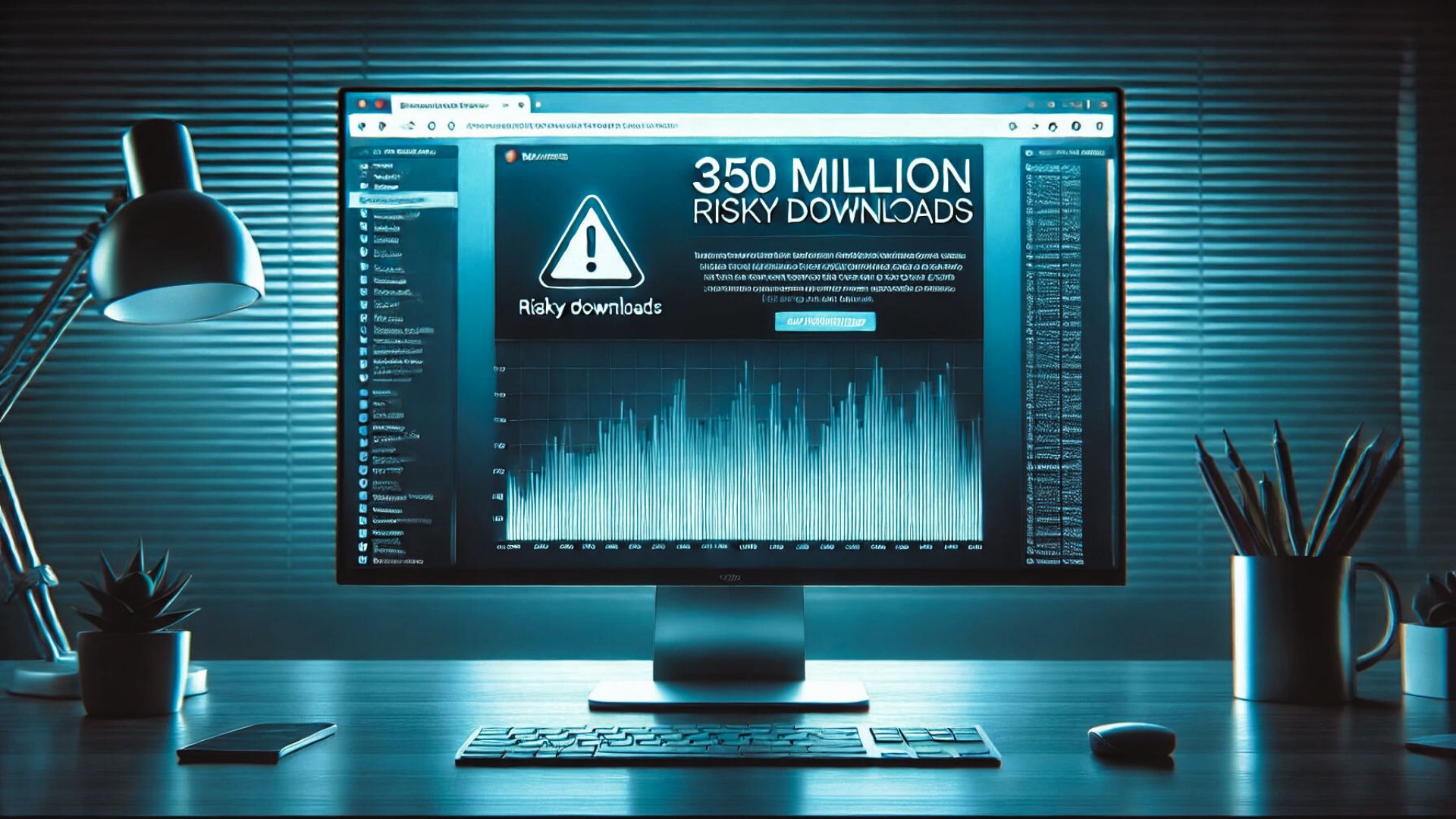
In the past three years alone, over 346 million users have installed at least one insecure extension, and 280 million have installed extensions found to contain malware, demonstrating the widespread risk and the potential for significant personal and business data compromise.
Proactive Measures for Enhanced Security
User Vigilance with Extensions:
Assessment Before Installation: Users should scrutinize the necessity and credibility of each extension. Investigating the developer, reading reviews, and checking the number of downloads can offer insights into the extension’s reliability.
Routine Audits: Regularly review and prune unnecessary or unused extensions to minimize potential exposure.
Enhancing Browser Security:
Antivirus and Anti-Malware Protection: Employ robust antivirus programs that offer real-time protection against malicious software, including harmful browser extensions.
Activate Browser Security Features: Modern browsers come equipped with various security settings that can help shield against untrusted extensions and websites.
Staying Informed:
Security Updates: Keeping abreast of the latest security news, updates, and alerts pertaining to browser extensions is crucial. Utilize community forums, official security bulletins, and trusted cybersecurity news sources.
Security Tools: Leverage tools designed to analyze and report on the security status of browser extensions to ensure your digital safety.
Conclusion: The Critical Need for Vigilant Cybersecurity Practices
The pervasive issue of insecure browser extensions underscores the necessity for vigilant cybersecurity practices. By staying well-informed and implementing strategic security measures, users can safeguard their personal and professional data from potential threats posed by compromised browser extensions.
For ongoing updates and in-depth insights into cybersecurity, ensure you stay connected with us at Peris.ai.
Stay vigilant, stay secure.
Your Peris.ai Cybersecurity Team #YouBuild #WeGuard
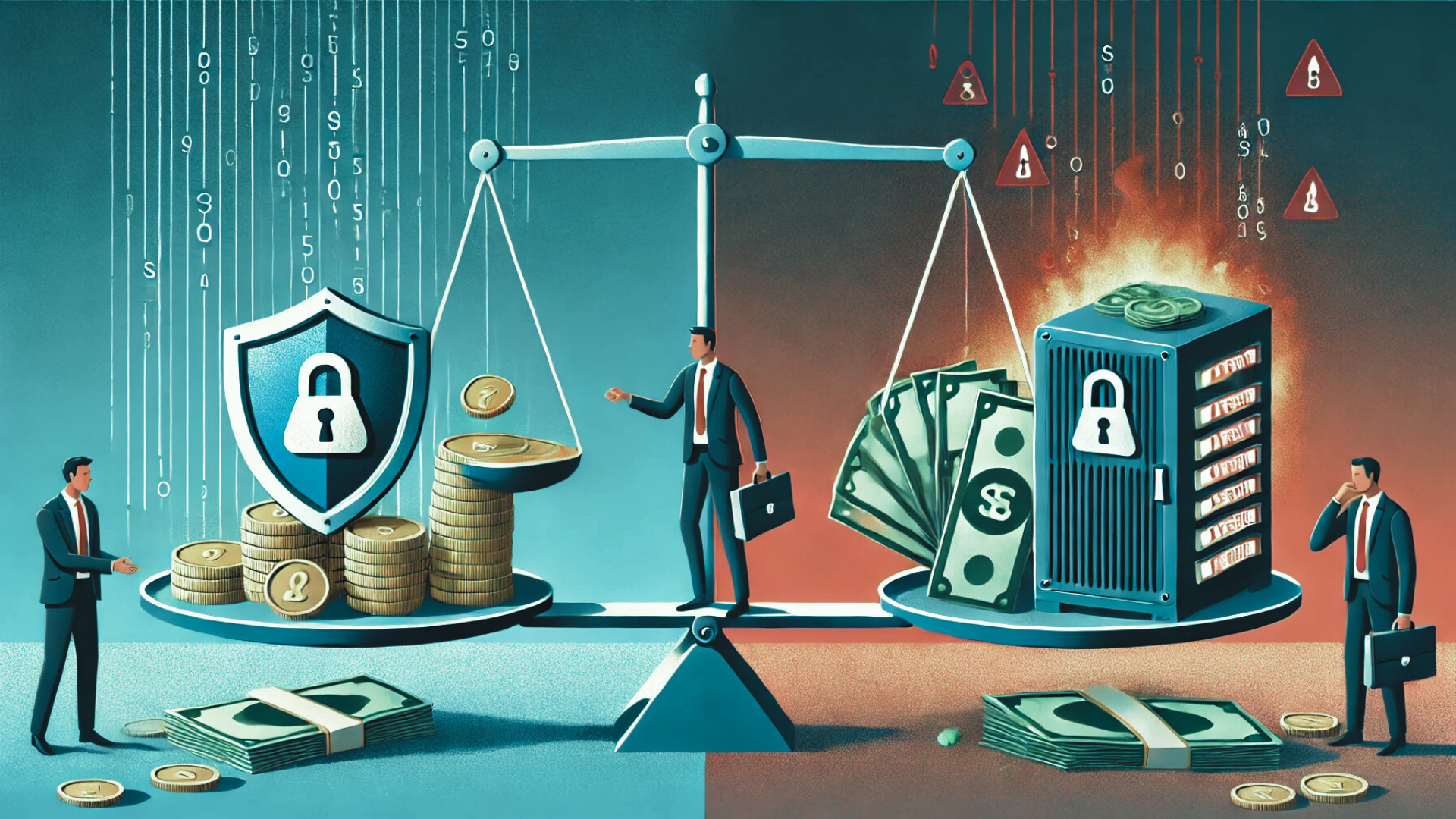
In an era where digital threats are evolving at an unprecedented rate, the importance of robust cybersecurity measures cannot be overstated. Organizations across the board are finding that the costs associated with preventing cyberattacks are significantly lower than those incurred from recovering from a breach. Let’s delve into why proactive cybersecurity investments are crucial for protecting your business financially and operationally.
Understanding the High Costs of Cybersecurity Breaches
Financial Implications
Staggering Costs: The average global cost of a data breach reached $4.45 million in 2023, according to an IBM study.
SMB Vulnerability: Small and medium-sized businesses often suffer disproportionately due to fewer resources to absorb the shock.
Operational and Reputational Damage
Business Disruption: Downtime needed for recovery can halt operations, causing significant financial drain and customer dissatisfaction.
Loss of Trust: A breach can severely damage a company’s reputation, leading to lost customers and decreased stakeholder trust.
Existential Risk: In severe cases, the financial strain from a breach can lead to business closure.
️ The Strategic Value of Cybersecurity Consulting
Proactive Defense
Cybersecurity consulting services proactively identify and address vulnerabilities, reducing the likelihood of costly breaches.
Tailored cybersecurity strategies can include comprehensive assessments, data protection protocols, continuous monitoring, and employee cybersecurity training.
Cost Management
Predictable Spending: Consulting services often come with clear, manageable costs tailored to fit SMB budgets.
Ongoing Support: Regular monitoring and updates ensure that defenses evolve in step with new threats, providing sustained protection without unexpected expenses.
Cost-Benefit Analysis: Prevention vs. Recovery
Investing in Cybersecurity Consulting
Structured, upfront investment focused on prevention.
Customized to align with specific business needs and risk profiles.
The Exorbitant Cost of Breaches
Unforeseen, large-scale expenses that can dwarf the costs of preventive measures.
Long-term damages include direct recovery costs and indirect impacts like reputational harm and lost business opportunities.
Long-Term Advantages of Cybersecurity Consulting
Risk Reduction: Consultants specialize in pinpointing and mitigating potential security risks.
Regulatory Compliance: Helps businesses meet data security standards specific to their industry, avoiding costly fines.
Educational Benefits: Provides ongoing training for employees, fortifying the human element of your cybersecurity defenses.
Operational Confidence: Allows business leaders to focus on growth and innovation with the assurance of a secure operational backdrop.
Conclusion: Prioritizing Cybersecurity Consulting for Future-Proof Business Operations
Investing in cybersecurity consulting is more than a safeguard; it’s a strategic business decision that preserves integrity, trust, and financial stability. The proactive approach not only mitigates risks but also aligns with long-term business objectives by ensuring continuous compliance and protection.
For comprehensive insights and to explore tailored cybersecurity solutions that protect against evolving threats, visit Peris.ai. Secure your future today.
Your Peris.ai Cybersecurity Team #YouBuild #WeGuard
In the digital era, QR codes have become a ubiquitous tool for the seamless exchange of information, heralded for their convenience and efficiency. However, this rapid adoption has also presented cyber-criminals with a new avenue for phishing attacks, introducing the concept of QR code phishing, or “quishing.”
The Surge of Quishing Attacks
Recent advisories, including a notable warning from the NCSC, highlight a significant increase in quishing attempts, targeting unsuspecting users with malicious QR codes designed to compromise sensitive information. These attacks exploit the general trust in QR codes, luring individuals into scanning codes that redirect them to fraudulent websites where their credentials are at risk.
Targeted Industries and Leadership
Quishing tactics have notably been directed at sectors like construction and engineering, as well as professional services, including legal and accounting firms, due to their valuable data and prevalent remote working practices. Moreover, individuals holding high-ranking positions within organizations, such as C-suite executives, are disproportionately targeted, given their extensive system access and the potential bounty their credentials represent.
Innovative Attack Vectors
Attackers employing quishing commonly disguise their schemes within notifications for multi-factor authentication (MFA) activities or document sharing services like DocuSign, capitalizing on the urgency and authenticity these contexts convey. This approach underscores the critical need for vigilance when responding to requests for authentication or access to confidential documents.
Combatting QR Code Phishing
The inherent novelty of QR codes as a phishing vector presents a unique challenge, bypassing conventional email security measures and exploiting a lack of public awareness. Education and training emerge as vital components in fortifying defenses against these attacks. Organizations are urged to cultivate a culture of skepticism and caution, akin to the scrutiny applied to traditional phishing emails.
AI-Driven Solutions for Enhanced Protection
Given the limitations of standard email security gateways (SEGs) in detecting quishing threats, a shift towards AI-native detection tools is imperative. These advanced solutions excel in identifying malicious QR codes within emails, analyzing their destinations, and employing behavioral analytics to unveil social engineering tactics. By leveraging AI technology, businesses can achieve a more dynamic and effective security posture capable of adapting to the evolving landscape of cyber threats.
Future Outlook and Preparedness
As QR codes continue to embed themselves in business operations, the expectation is that cyber-criminals will persist in exploiting them for malicious purposes. It is, therefore, paramount for organizations to embrace continuous security awareness training and integrate cutting-edge detection technologies into their cybersecurity frameworks. By doing so, they can safeguard against not only the current wave of quishing attacks but also future innovations in phishing tactics.
Peris.ai Cybersecurity remains dedicated to guiding businesses through the complexities of digital security, offering insights and solutions tailored to navigate the threats of today and tomorrow. Embracing a proactive stance and equipping teams with the knowledge and tools necessary for defense will ensure that organizations can continue to leverage QR codes without compromising their security integrity.
As we use more digital tech, keeping our cybersecurity up is key. Cybercriminals are always looking for new ways to trick people. A big 86% of companies hit by ransomware were attacked on holidays or weekends.
This shows hackers work all the time, and so should your security. Good cybersecurity is vital to keep your business safe from digital threats.
It’s important to invest in strong cybersecurity and online safety. With more complex cyber attacks, old defenses won’t cut it. You must stay alert and keep up with new threats.
By focusing on ongoing cybersecurity, you can shield your business from cyber attacks’ harm.
Key Takeaways
Hackers often launch attacks on weekends or holidays, when security teams may be less vigilant.
86% of companies targeted by ransomware were attacked on a holiday or weekend.
Continuous cybersecurity is essential to protecting your business from evolving threats.
Robust online security measures can help prevent cyber attacks.
Investing in cybersecurity can help safeguard your business from devastating consequences.
Cyber attacks are highly targeted and sophisticated, making traditional defenses insufficient.
The Rising Tide of Weekend Cyber Attacks
Weekend cyber attacks are on the rise, with about 60% of all cyber incidents happening then. This is a big worry, showing we need strong network protection and IT security to stop data breaches.
More than 45% of cybersecurity experts say they’ve seen more attacks on Saturdays and Sundays. They also face a 30% longer wait to deal with cyber incidents on weekends. This delay can cost a lot, with weekend attacks causing an average loss of $1.4 million.
The following statistics show how serious this problem is:
70% of surveyed organizations have inadequate weekend security measures in place.
50% of companies do not have incident response teams operational during weekends.
80% of ransomware attacks start over the weekend, when they know organizations have fewer resources.
To fight these threats, 90% of IT professionals suggest constant monitoring. By focusing on network protection and IT security, companies can lower the chance of data breaches. This also helps reduce the financial damage from weekend cyber attacks.
Meet Company X: A Target During Downtime
Company X is a top player in its field. Recently, hackers hit them during downtime. This attack led to a big information security breach, losing sensitive data and halting work.
This shows how vital secure websites and strong security are, even when not in use.
The breach at Company X was due to human mistakes and weak security. Stats show 88 percent of breaches come from human errors, costing $4.88 million on average. Hackers found a weak spot in the system, getting to sensitive info and causing big harm.
To avoid such breaches, companies must focus on information security and secure websites. They should set up strong security, check for vulnerabilities often, and train staff on cybersecurity. These actions help lower the risk of a breach and keep data safe.
Some important steps for better information security include: Doing regular security checks and risk assessments Using strong security tools like firewalls and intrusion detection Training employees on cybersecurity Investing in secure websites and solid security measures
The Vulnerability Assessment
Doing a deep dive into vulnerability assessment is key to spotting security holes and weak spots. It’s about checking how well digital shields and cybersecurity steps work to stop breaches. With strong digital defenses, companies can cut down cyber attack risks and keep their data safe.
Risk analysis is a big part of this. It finds out what threats might hit and what to do first. It looks at how likely a breach is, how bad it could be, and how good current security is. With the right digital shields and cybersecurity know-how, companies can make a solid plan to tackle risks.
Initial Security Gaps
Security gaps often include old software, weak passwords, and poor network setup. These holes can let attackers sneak into a company’s systems and data. Fixing these weak spots with strong digital shields and cybersecurity can really lower breach risks and keep assets safe.
Risk Analysis Findings
Risk analysis shows the need for better digital shields and cybersecurity. This might mean getting new threat detection tools, doing regular security checks, and teaching employees about cybersecurity. By focusing on these, companies can make their cybersecurity stronger and lower breach risks.
Critical Points of Exposure
Critical weak spots are where a company’s digital shields and cybersecurity are most at risk. These might be old systems, unpatched bugs, or bad access controls. Fixing these weak spots can greatly lower breach risks and keep sensitive data safe.
Hackers Don’t Take Weekends Off: The Wake-Up Call
The need for constant cybersecurity is clear, as hackers don’t take weekends off. The FBI’s Internet Crime Complaint Center saw nearly 56,000 reports of personal data breaches in 2023. With about 100 different account passwords and logins, keeping everything secure is tough.
Some important stats show how serious this problem is:
The Identity Theft Resource Center found victims of identity theft lost millions, mainly from crypto and romance scams.
Many breaches come from automated or scalable attacks, not just direct financial theft.
Nation-state attacks often aim to gather information for intelligence or to gain an edge, not always causing immediate financial loss for individuals.
Given these numbers, companies must act fast to protect themselves. They need to understand that hackers don’t take weekends off. By focusing on cybersecurity and using strong security measures, companies can lower the chance of data breaches. This helps keep their customers’ personal info safe.
Year: Number of Reports
2022 over 200,000
2023 nearly 56,000
Implementing 24/7 Security Protocols
To keep your IT security and network safe, it’s key to have 24/7 security protocols. This means keeping your tech up to date, training your team, and having plans for emergencies. These steps help protect your organization from threats.
Here are some important steps for 24/7 security:
Do regular security checks to find weak spots in your network and devices.
Use firewalls and network security tools for constant protection.
Have strong password rules and multi-factor authentication to stop hacks.
Train your team regularly to make them security experts.
By focusing on IT security and network protection, you can lower the chance of data breaches and cyber attacks. As cybersecurity threats keep changing, it’s vital to stay ahead. With good security plans, your business can keep its systems and data safe, even when you’re not working.
Doing security audits and penetration tests helps find weak spots in your network. This lets you fix problems before they get used by hackers. Adding this to constant network watching and having a plan for security issues means your business is always ready to face any security problem.
Continuous Monitoring Solutions
Continuous monitoring solutions are key in stopping cyber attacks. They help improve cybersecurity and online security. These tools give real-time insights, letting businesses quickly fix security issues before they become big problems.
Recent stats show cyber attacks went up by 30% in 2024. On average, a business faces 1,636 attacks every week.
Using these solutions can cut down on security incidents. For example, regular scans can find hidden malware or weaknesses. This lowers the chance of data breaches. Also, penetration testing can find and fix weaknesses fast, saving time and effort.
Some main benefits of these solutions are:
Improved incident response efficiency by 95%
Reduced detection times for breaches from weeks to minutes
Enhanced security posture, resulting in fewer data breaches and lower costs
It’s vital for businesses to invest in continuous monitoring solutions. As online security keeps changing, staying ahead of threats is essential. With these solutions, businesses can keep their data safe, lowering the risk of cybersecurity breaches and costs.
In the world of round-the-clock security, people are key to keeping digital information safe. A culture that values security is critical today. This is because threats can pop up at any time.
To build a security-first culture, we need to train and educate staff. These programs should teach employees about the importance of digital safety. They should also give them the tools to spot and handle threats.
Staff Training and Awareness
Good staff training and awareness programs boost an organization’s security. By teaching employees about the latest threats and best practices, they can protect sensitive info. This makes them more proactive in keeping data safe.
Some important parts of staff training include:
Regular security awareness training sessions
Phishing simulation exercises
Incident response planning and training
Continuous monitoring and feedback mechanisms
By focusing on the human side of security, organizations can improve their defenses. This helps reduce the chance of security breaches and cyber threats.
Measuring Success: Security Metrics That Matter
To make sure cybersecurity and online security work well, it’s key to watch and study important metrics. This means keeping an eye on how many incidents happen, how fast we respond, and how they affect the company. Regular security audits and vulnerability scanning help spot risks and weak spots.
It’s also vital to check how good our incident response is. A 2022 IBM survey showed 68% of people often handle more than one incident at once. This shows we need quick and smart ways to deal with incidents. Also, a Sophos survey found 85% of people felt burned out, which hurts our security efforts.
Some key security metrics to keep an eye on are:
Incident response time
Number of incidents
Types of incidents (e.g., phishing, ransomware)
Employee training and awareness
System updates and patch management
By watching these metrics and using good cybersecurity and online security, companies can lower the chance of problems.
Return on Security Investment
Investing in it security and network protection can greatly benefit a company’s finances. Studies show that 70% of organizations see a positive Return on Security Investment (ROSI) from their cybersecurity efforts. This is because strong security programs can cut breach costs by 24% on average.
Some key areas where it security and network protection offer a return include:
Cost savings from fewer breach incidents
Improved efficiency through security automation
Enhanced reputation and customer trust
Also, investing in it security and network protection can save companies from the high costs of data breaches. The average cost of a data breach in the U.S. is $4.24 million. By investing in security, companies can lower the risk of a breach and avoid these costs.
In summary, investing in it security and network protection is vital for any company’s security strategy. It offers a return on investment, helping companies improve their finances while reducing the risk of expensive data breaches.
Future-Proofing: Beyond Traditional Security Hours
As cybersecurity threats grow, it’s key for companies to keep their security up to date. Hackers don’t take weekends off, and your security shouldn’t either. With more non-human identities and high-level access, cyber attacks are a bigger risk than ever.
One big issue in cybersecurity is infrastructure sprawl. It can cause security tool overlaps and increase risks. To outsmart hackers, companies need ongoing cybersecurity efforts. This includes regular password changes and AI for threat detection.
Some important stats show why cybersecurity awareness is critical:
For every human user, there are 20 non-human identities, often with high-level privileges, posing significant risks.
53 percent of organizations take over 13 weeks to rotate passwords, creating unnecessary vulnerabilities.
80 percent of surveyed organizations responded to what they believe to be AI-based attacks or threats within the last 12 months.
By focusing on cybersecurity and keeping up with new threats, companies can defend against hackers who work all the time. It’s time to move beyond old security hours. Invest in a strong cybersecurity plan that can handle today’s threats.
Conclusion: Securing Your Business Around the Clock
Cyber threats are evolving rapidly, and businesses must stay ahead with automation and orchestration to enhance their cybersecurity posture. With the average cost of a data breach reaching $4.88 million in 2024, organizations can no longer afford reactive security measures. Proactive automation is the key to minimizing risks and ensuring 24/7 protection against emerging threats.
Brahma Fusion empowers security teams by:
Automating security workflows to reduce manual effort and human errors.
Enhancing orchestration by seamlessly integrating security tools and platforms.
Improving response times with real-time threat detection and incident management.
By leveraging customizable security responses, an intuitive drag-and-drop interface, and precision scripting, organizations can build a cybersecurity strategy that is resilient, scalable, and highly efficient.
Take control of your security operations with Brahma Fusion. Visit https://www.peris.ai/ to explore how automation and orchestration can transform your cybersecurity strategy.
FAQ
What is the significance of continuous cybersecurity, and how does it impact my business?
Continuous cybersecurity is key because hackers never stop. They often target companies on weekends or holidays. This shows the need for constant online security and cybersecurity measures.
Why do hackers target companies during off-hours, and what are the consequences of weekend vulnerabilities?
Hackers go after companies when they’re less protected. This is because network and IT security are weaker during off-hours. It makes it easier for them to breach data, leading to big financial losses and damage to reputation.
How can I ensure that my website is secure, and what role does information security play in protecting my business?
To keep your website safe, use information security steps. This includes encrypting data, using secure protocols, and updating software and plugins. These actions help prevent cyber attacks and protect your business from data breaches.
What is a vulnerability assessment, and how can it help identify security gaps in my business?
A vulnerability assessment finds and checks security gaps in your business’s digital defenses. It helps you take steps to fix these issues and prevent cyber attacks.
Why is it essential to implement 24/7 security protocols, and what measures can I take to improve my business’s IT security and network protection?
Having 24/7 security is vital. It includes updating technology, training staff, and having emergency plans. These steps improve IT security and network protection, helping to prevent attacks and breaches at any time.
How can continuous monitoring solutions help detect and prevent cyber attacks, and what benefits do they offer for my business’s online security?
Continuous monitoring solutions watch your online security in real-time. They help spot and stop cyber attacks quickly. This keeps your business safe from data breaches and other threats.
What role does the human element play in round-the-clock security, and how can I build a security-first culture in my business?
People are key in round-the-clock security. Building a security-first culture means training staff on digital safety. It also means creating a culture where everyone is aware and responsible for security.
How can I measure the success of my business’s security measures, and what security metrics should I use to evaluate their effectiveness?
To see if your security measures work, use important security metrics. Look at incident response times, attack detection rates, and data breach prevention. These help you see how well your cybersecurity is doing.
What is the return on security investment, and how can I analyze the cost savings and prevention vs. recovery economics of my business’s security measures?
The return on security investment is the savings and benefits from IT security. Analyzing the cost savings and prevention vs. recovery economics helps you see if your security investments are worth it. It guides your decisions on cybersecurity.
How can I future-proof my business’s security, and what measures can I take to stay ahead of hackers and cyber threats?
To keep your business secure, use continuous cybersecurity. Stay updated on the latest threats and trends. Always check and improve your digital safeguards to stay ahead of hackers and threats.
Human Risk Management (HRM) is emerging as a pivotal component in cybersecurity, focusing on mitigating risks associated with human behavior in organizations. With over 80% of security incidents attributable to human error, it’s clear that technical defenses alone are insufficient to protect modern businesses. This newsletter delves into the significance of HRM, exploring its principles and how to effectively implement it to safeguard your organization.
Understanding Human Risk Management
HRM Explained: HRM tackles security vulnerabilities that arise from human actions—whether accidental, negligent, or malicious—unlike traditional risk management, which primarily addresses systems and infrastructure. The goal of HRM is to enhance awareness, cultivate safe practices, and significantly diminish the chance of errors through comprehensive training and policy development.
The Importance of Human Risk Management
Human Factors in Cybersecurity:
Human error plays a role in approximately 80% of cybersecurity breaches.
Simple mistakes by employees can lead to significant security threats, including phishing and compromised credentials.
Proactive HRM Strategies:
HRM emphasizes preventative measures over merely reactive responses, aiming to forestall incidents before they occur.
Key to this approach is security awareness training, which equips employees with the skills to identify and thwart potential threats.
Leadership and HRM:
Effective HRM requires robust leadership to embed a security-conscious culture within the organization.
Leaders must ensure that security policies are clear, comprehensive, and understood by all team members.
Core Principles of Human Risk Management
Risk Identification:
It’s crucial to identify behaviors that increase risk, such as negligence or insider threats.
Tools like simulated phishing emails can help pinpoint vulnerabilities.
Risk Mitigation through Training and Policies:
Develop and enforce security awareness programs and policies that minimize risks from common human errors.
Leadership Involvement:
Leaders should actively promote and model security best practices, integrating HRM into the overall risk management framework.
Behavioral Considerations:
Address psychological and cultural elements, such as employee stress or organizational culture, which can inadvertently lead to security breaches.
Building an Effective HRM Framework
Risk Assessment: Employ threat simulation tools to assess how susceptible your organization is to various human-related risks.
Policy Development: Craft explicit security guidelines that are outlined in employee manuals to standardize behaviors across the organization.
Continuous Training: Conduct regular training sessions to keep the workforce informed about the latest cybersecurity threats and prevention techniques.
Monitoring and Feedback: Utilize key performance indicators (KPIs) and analytics to monitor the effectiveness of HRM initiatives and make necessary adjustments.
Cultivating a Security-First Culture: Encourage open discussions about security, recognize secure behaviors, and integrate security into the organizational ethos.
Conclusion: Prioritize Human Factors in Cybersecurity
Human Risk Management is not just a strategy but a necessity in the quest to fortify businesses against cyber threats. By focusing on human factors, companies can enhance their overall security posture and prevent the vast majority of breaches driven by human errors.
For more insights into effective cybersecurity practices and to stay updated with the latest trends, visit Peris.ai.
Your Peris.ai Cybersecurity Team #YouBuild #WeGuard
Mobile security is a growing concern in today’s digital landscape. With the increasing use of smartphones and the vast amounts of sensitive data stored on these devices, the risk of mobile malware has become a top priority for organizations. Malicious attacks, such as ransomware, spyware, and Trojan horses, can have severe consequences, including data theft, operational disruptions, and compromised device security.
In this article, we will explore the myths and the reality of malware detection in mobile devices. We will delve into the various types of mobile malware, the threats they pose, and the strategies organizations can implement to safeguard their smartphones. By debunking common myths and shedding light on effective detection techniques, we aim to provide valuable insights into the ever-evolving field of mobile security.
Key Takeaways:
Mobile devices are vulnerable to various types of malware, including ransomware, spyware, and Trojan horses.
Malicious attacks can lead to data theft, operational disruptions, and compromised device security.
Understanding the threats of mobile malware is crucial for organizations to implement effective detection strategies.
Android devices are particularly vulnerable due to the open-source nature of the operating system.
Google has taken steps to enhance Android security through monthly security patches and Google Play Protect.
The Threat of Mobile Malware
Mobile malware has evolved into sophisticated forms, capable of causing significant damage to organizations of all sizes. It can be distributed via various tactics such as phishing, smishing (SMS phishing), and infected apps. Common types of mobile malware include spyware, ransomware, and Trojan horses. These threats can result in data breaches, financial losses, and reputational damage.
Mobile malware is a growing concern due to the widespread use of smartphones and tablets in both personal and professional settings. The increasing reliance on mobile devices for communication, online transactions, and data storage has made them attractive targets for cybercriminals.
Distribution Tactics
“Attackers employ various tactics to distribute mobile malware and target unsuspecting users. Phishing emails and text messages are commonly used to trick users into revealing sensitive information or downloading malicious apps. They often impersonate legitimate organizations or individuals to gain the trust of their targets.”
Once a user falls victim to a phishing attack, they may unknowingly install malware on their device. These malicious apps can then gain unauthorized access to personal information, monitor user activities, and even lock devices until a ransom is paid.
Types of Mobile Malware
Several types of mobile malware can infect devices and compromise security:
Spyware: This type of malware is designed to spy on users and gather sensitive information such as passwords, banking credentials, and personal data.
Ransomware: Ransomware locks users out of their devices or encrypts their files until a ransom is paid. It can cause significant financial losses and disrupt business operations.
Trojan horses: Trojan horses appear as legitimate applications but contain hidden malicious code. They can compromise device security and steal sensitive information.
Mobile malware poses serious risks to individuals and organizations, including:
Data breaches and loss of sensitive information
Financial losses due to unauthorized transactions or ransom payments
Reputational damage and loss of customer trust
Disruption of business operations
Individuals and organizations must take proactive measures to protect against mobile malware. Implementing robust security measures, such as using reputable antivirus software, practicing safe browsing habits, and updating devices regularly, can help mitigate the risks associated with mobile threats.
Real-World Examples
“In 2020, a major mobile malware attack targeted Android users in Southeast Asia, infecting millions of devices. The malware, known as ‘Agent Smith,’ disguised itself as a legitimate app and then replaced installed apps with malicious versions.”
This widespread attack highlights the severity of the mobile malware threat and the need for stronger security measures. Organizations must stay vigilant and keep abreast of the latest mobile malware trends to safeguard their data and devices.
Type of Mobile Malware Description Spyware Designed to spy on users and gather sensitive information such as passwords and personal data Ransomware Locks users out of their devices or encrypts their files until a ransom is paid Trojan horses Appear as legitimate applications but contain hidden malicious code
Detecting Mobile Malware on Android Devices
Android devices are particularly vulnerable to malware due to the open-source nature of the operating system and the fragmented ecosystem. It is essential for users and IT professionals to be able to detect malware on Android devices to ensure their security and protect against potential threats.
Several signs indicate the presence of malware on an Android device. Users may notice a sudden increase in data usage without any apparent reason. This could be due to malware running in the background and transferring data without the user’s knowledge or consent.
Another red flag is unexpected app installations. If new apps appear on your device without your consent or if you did not intentionally download them, malware may be responsible for these installations.
Unfamiliar ads or pop-ups that appear frequently on your device can also be a clear indication of malware. These ads often disrupt your browsing experience and can be difficult to close or remove.
Malware can also significantly impact the performance of your Android device. If you notice a sudden decrease in speed, frequent freezes, or crashes, it could be a sign that malware is affecting the device’s functionality.
To detect and remove malware from Android devices, users and IT professionals can follow these steps:
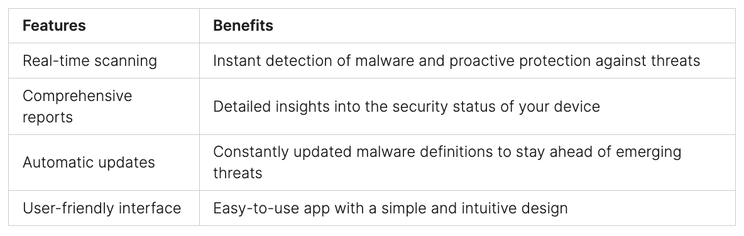
Utilize mobile threat detection tools: There are various mobile security apps available that can scan your device for malware and alert you to any potential threats. These tools analyze the device for suspicious behavior, identify malicious apps, and help in their removal.
Enforce security policies through Mobile Device Management (MDM): IT professionals can leverage MDM solutions to enforce security policies, remotely monitor devices, and detect any anomalies that may indicate malware infections. MDM allows for granular control and helps in preventing unauthorized app installations and other risky activities.
Uninstall suspicious apps: If you suspect that a particular app is malware-infected, it is essential to uninstall it from your device immediately. Look for apps that you did not install or that have suspicious permissions or behavior.
By taking these steps, Android users can effectively detect and remove malware from their devices, ensuring a safer mobile experience.
To further illustrate the process of detecting malware on Android devices, here is an actual example of a mobile threat detection tool in action:
“Using our advanced mobile security app, you can scan your Android device for malware and other security threats in just a few taps. The app thoroughly examines your device’s files, apps, and settings to detect any signs of malicious activity. It provides real-time alerts and comprehensive reports, allowing you to take immediate action and remove any detected malware.”
Example: Mobile Threat Detection Tool
Mobile Malware Prevention Measures
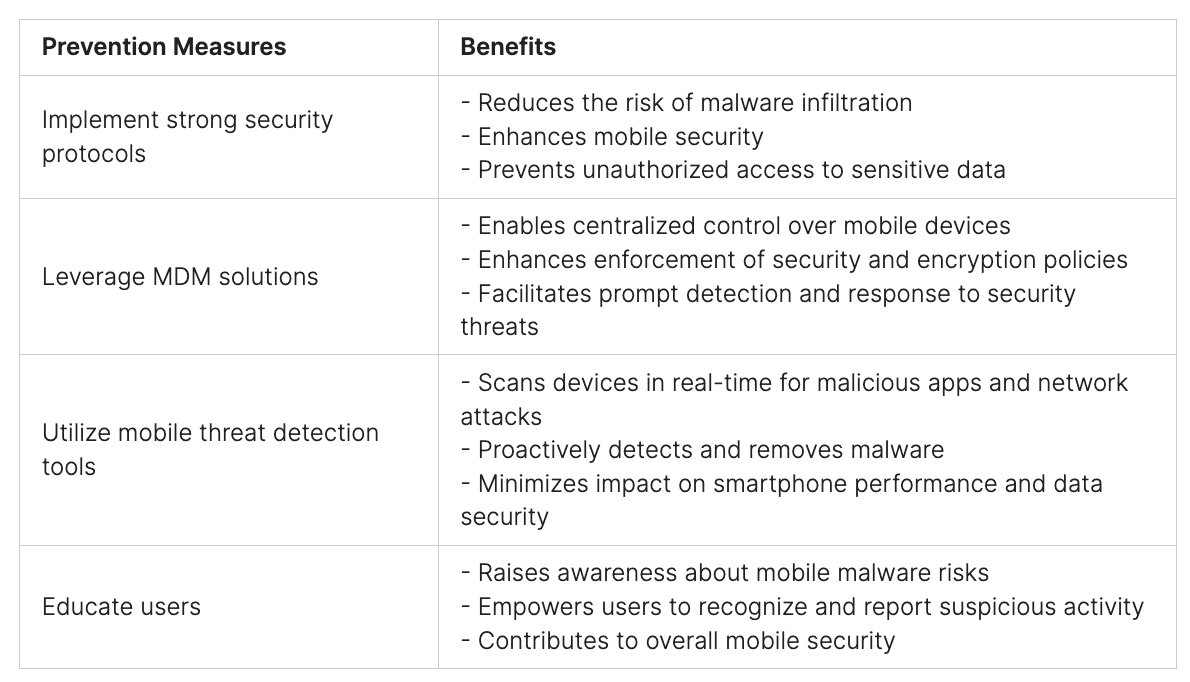
Effective mobile security requires organizations to implement robust prevention measures to safeguard against malware threats. By adopting strong security protocols, leveraging mobile device management (MDM) solutions, and utilizing mobile threat detection tools, organizations can enhance smartphone protection and mitigate the risks associated with mobile malware.
Implement Strong Security Protocols
Authentication and authorization requirements play a crucial role in preventing mobile malware infections. By enforcing stringent access controls, organizations can ensure that only authorized users can access sensitive data and applications on smartphones. This reduces the risk of malware infiltration and unauthorized access, enhancing overall mobile security.
Leverage Mobile Device Management (MDM) Solutions
MDM solutions provide organizations with centralized control over mobile devices, enabling the enforcement of security and encryption policies. These solutions allow admins to remotely manage and monitor devices, ensuring compliance with security standards. With MDM, organizations can detect and respond to potential security threats promptly, safeguarding smartphones from malware attacks.
Utilize Mobile Threat Detection Tools
Mobile threat detection tools are designed to scan devices in real time for malicious apps and network attacks. These tools employ advanced algorithms and machine-learning techniques to identify potential malware infections. Real-time scanning helps organizations proactively detect and remove malware, minimizing the impact on smartphone performance and data security.
Educate Users about Recognizing and Reporting Suspicious Activity
Human error can often lead to malware infections on smartphones. Therefore, educating users about the risks associated with mobile malware and the importance of practicing safe browsing habits is crucial. Users should be aware of the signs of malware infection and understand how to report suspicious activity to IT or security teams promptly. This proactive approach empowers users to contribute to mobile security and prevent malware incidents.
“Prevention is better than cure. By implementing strong security protocols, leveraging MDM solutions, utilizing mobile threat detection tools, and educating users, organizations can effectively safeguard their smartphones from malware threats.”
Google’s Efforts to Improve Android Security
Android security is a top priority for Google, and the company has implemented various measures to enhance the security of the Android operating system. These efforts aim to protect users from mobile malware and address the vulnerabilities associated with Android devices.
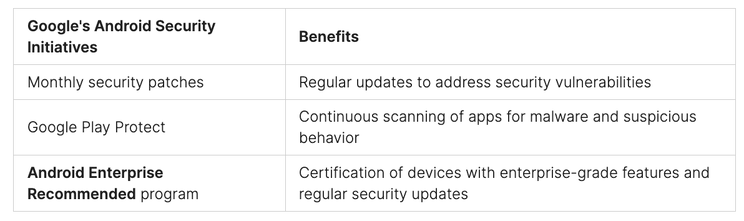
One significant step taken by Google is the provision of monthly security patches. These patches ensure that Android devices receive regular updates to fix security vulnerabilities and protect against emerging threats.
To further strengthen Android security, Google introduced Google Play Protect. This comprehensive security service is built into Google Play, the official app store for Android. Google Play Protect continuously scans apps downloaded from the store, looking for any signs of malware or suspicious behavior. This proactive approach helps to keep Android devices safe and secure.
Additionally, Google launched the Android Enterprise Recommended program. This program certifies devices that meet Google’s stringent requirements for enterprise-grade features and regular security updates. By recommending devices that adhere to these standards, Google aims to provide businesses with reliable and secure Android devices for their workforce.
The efforts made by Google to improve Android security have had a significant impact on mobile device security overall. These initiatives demonstrate Google’s commitment to ensuring the safety of Android users and creating a secure environment for mobile applications.
By implementing these measures, Google has significantly enhanced the security of the Android operating system and provided users with a safer mobile experience. Android users can now enjoy the benefits of a robust security framework, ensuring protection against mobile malware and other security threats.
Steps to Remove Mobile Malware from Android Devices
If a device is infected with malware, users, and admins can take several steps to remove it. Here are the recommended actions:
Utilize mobile threat detection tools: These tools can help identify and eliminate malware from Android devices effectively. They scan the device for malicious apps and provide insights into potential infections.
Enforce security policies through MDM: Mobile Device Management (MDM) solutions can be used to enforce security policies on Android devices. By disabling app installations from unknown sources, organizations can prevent further malware infections.
Uninstall suspicious apps: Users should uninstall any apps that appear suspicious or have unknown origins. These apps might be the source of malware. It is crucial to regularly review and remove unwanted or suspicious apps from Android devices.
Keep Android devices up to date: Keeping devices up to date with the latest security patches is essential for protecting against malware. Regularly check for system updates and install them promptly to ensure the latest security measures are in place.
Consider a factory reset: In extreme cases where malware persists despite taking preventive measures, performing a factory reset may be necessary. However, this should be the last resort, as it erases all data and settings on the device. Before performing a factory reset, it is recommended to back up important data and consult with IT professionals.
By following these steps, users can effectively remove mobile malware from their Android devices and ensure a secure mobile experience.
Removing mobile malware from Android devices is crucial for maintaining device security and protecting sensitive data.
Best Practices for Ransomware Detection and Prevention
Ransomware poses a significant threat in the mobile security landscape. Detecting and preventing ransomware attacks early is crucial to minimizing the potential damage.
To effectively respond to and mitigate the impact of ransomware attacks, organizations should implement a robust incident response plan. This plan should include the following best practices:
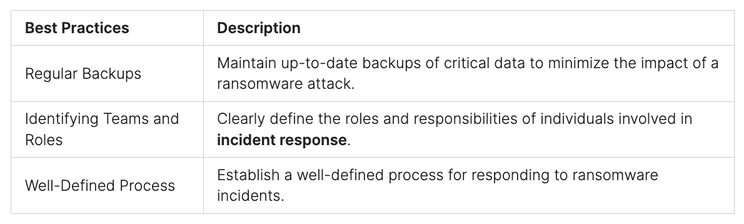
Regular Backups: Maintain up-to-date backups of critical data to minimize the impact of a ransomware attack. These backups should be stored securely and offline to prevent them from being affected by the attack.
Identifying Teams and Roles: Clearly define the roles and responsibilities of individuals involved in incident response. This includes designating specific teams for detection, analysis, containment, and communication.
Well-Defined Process: Establish a well-defined process for responding to ransomware incidents. This process should outline the necessary steps to be taken, including isolating affected systems, investigating the extent of the attack, and notifying the appropriate parties.
By implementing these best practices, organizations can enhance their ransomware detection and prevention capabilities, minimizing the potential damage caused by these malicious attacks.
Best Practices for Ransomware Detection and Prevention
Importance of Monitoring and Response to Mobile Threats
Effective mobile security requires proactive monitoring and swift incident response to address potential threats. By utilizing mobile threat monitoring tools and establishing an incident response plan, organizations can enhance their defense against mobile malware and safeguard their sensitive data.
Mobile threat monitoring enables real-time detection of potential malware infections and network attacks on mobile devices. With continuous monitoring and analysis of device logs, organizations can identify and prioritize incidents for immediate action. This proactive approach ensures timely threat detection and response, minimizing the potential impact of mobile threats.
Having a well-defined incident response plan is vital in mitigating the risks posed by mobile threats. The plan should outline roles and responsibilities, communication procedures, and steps to be taken in the event of a security incident. By establishing clear guidelines and protocols, organizations can swiftly respond to and contain mobile threats, preventing further compromise of their mobile security.
Benefits of Mobile Threat Monitoring and Incident Response:
Real-time Detection:Mobile threat monitoring tools provide continuous monitoring, offering real-time insights into potential malware infections and network attacks.
Swift Response: An incident response plan enables organizations to promptly identify, analyze, and mitigate the impact of mobile threats, minimizing operational disruptions and data breaches.
Timely Threat Detection: Regular monitoring, analysis of logs, and prioritization of incidents facilitate early detection and response to mobile threats, preventing their escalation.
Data Protection: Proactive monitoring and incident response measures help safeguard sensitive data on mobile devices, ensuring compliance with data protection regulations.
“Continuous monitoring and swift incident response are key components of an effective mobile security strategy. By implementing robust mobile threat monitoring practices and having an incident response plan in place, organizations can proactively protect their mobile devices and mitigate the impact of potential mobile threats.”
In summary, mobile threat monitoring and incident response are vital in maintaining mobile security. These proactive measures enable organizations to detect and respond to potential malware infections and network attacks in real time, minimizing the impact on their operations and data. By prioritizing threat detection, establishing a comprehensive incident response plan, and utilizing relevant tools, organizations can effectively safeguard their mobile devices and protect against evolving mobile threats.
Planning for a Ransomware Attack on Mobile Devices
Organizations must prioritize mobile security planning to ensure they are well-prepared for a potential ransomware attack on their mobile devices. By implementing a comprehensive incident response plan and integrating automation tools, organizations can effectively minimize the impact of such attacks. The following key strategies can aid in planning and executing an efficient ransomware incident response:
Ensure Offline Backups: Regularly back up critical data and store it offline to prevent ransomware encryption and ensure data recovery in case of an attack.
Identify Teams and Roles: Clearly define the teams and roles responsible for handling a ransomware incident, including IT personnel, security analysts, legal advisors, and management representatives.
Integrate Automation Tools: Leverage automation tools and security technologies to enhance incident response efficiency and reduce response times.
Utilize Asset Management Solutions: Implement asset management solutions to track system owners and applications, helping identify potential vulnerabilities and respond promptly to ransomware incidents.
Employ Threat Intelligence: Utilize comprehensive threat intelligence to stay updated on the latest ransomware trends, techniques, and indicators of compromise.
Develop Breach Response Playbooks: Create detailed breach response playbooks that outline step-by-step procedures for responding to ransomware incidents, ensuring a systematic and efficient response.
By following these proactive measures, organizations can enhance their readiness to tackle ransomware attacks on mobile devices and effectively safeguard their critical data and systems.
Conclusion
Effectively tackling mobile malware demands a multifaceted approach, blending robust security protocols with advanced detection tools and informed user practices. Ensuring smartphone security in organizational settings is not just about the tools and technologies employed; it also hinges on demystifying common misconceptions about mobile threats and adopting concrete, proactive measures.
Key to this strategy is the enforcement of stringent security protocols. Organizations should prioritize strict authentication and authorization measures, leverage mobile device management (MDM) solutions, and focus on educating users about identifying and reporting suspicious activities. These steps form a layered defense against mobile malware incursions, acting as critical barriers to potential breaches.
Equally vital in this cybersecurity equation are mobile threat detection tools. Such technologies play an indispensable role by scanning devices in real-time, rooting out malicious applications, and offering instant insights into possible malware infiltrations and network threats. Regular monitoring and response planning, in conjunction with ongoing collaboration with cybersecurity experts, further empowers organizations to maintain a proactive and resilient stance in the face of mobile security challenges.
Peris.ai Cybersecurity provides a comprehensive solution to these challenges with our product, Peris.ai Brahma Mobile Endpoint Detection Response (MEDR). Our key features include Log Collector, Command Execution, File Integrity Monitoring (FIM), Security Configuration Assessment (SCA), System Inventory, Malware Detection, Active Response, and Container Security Monitoring. These features are designed to offer thorough protection and proactive management of mobile security threats.
By integrating strong security practices, leveraging cutting-edge mobile threat detection tools like Peris.ai Brahma, and cultivating a culture of cybersecurity awareness, organizations can effectively combat the scourge of mobile malware. Visit Peris.ai Cybersecurity to explore how our solutions can bolster your mobile security and help you navigate the complex cybersecurity landscape with confidence and sophistication.
FAQ
What are some common types of mobile malware?
Common types of mobile malware include spyware, ransomware, and Trojan horses.
How can I detect malware on my Android device?
Signs of malware infection on Android devices may include high data usage, unexpected app installations, unfamiliar ads or pop-ups, and degraded performance.
Are there any free ways to check for malware on Android?
Mobile threat detection tools can help detect and remove malware from Android devices. Some of these tools are available for free.
What preventive measures can I take to protect my smartphone from malware?
Implementing strong security protocols, utilizing mobile threat detection tools, and educating users are crucial preventive measures to protect smartphones from malware.
What efforts has Google made to improve Android security?
Google provides monthly security patches, Google Play Protect for scanning apps for malware, and the Android Enterprise Recommended program to enhance Android security.
How can I remove malware from my Android device?
Utilizing mobile threat detection tools, enforcing security policies through mobile device management (MDM), and uninstalling suspicious apps can help remove malware from Android devices.
How can I detect and prevent ransomware attacks on my mobile device?
Implementing intelligent security analytics, regular backups, and having a well-defined incident response plan is key to detecting and preventing ransomware attacks on mobile devices.
Why is monitoring and responding to mobile threats important?
Monitoring and responding to mobile threats in real time help maintain mobile security and minimize the potential impact of malware attacks.
How should I plan for a ransomware attack on my mobile devices?
Planning for a ransomware attack includes ensuring offline backups, identifying teams and roles for incident response, and integrating automation tools for faster response times.
Are there any real-world examples of successful mobile malware mitigation?
Organizations have partnered with cybersecurity providers to strengthen their defenses against mobile threats, utilizing advanced security solutions and enhancing threat intelligence.
What are the main takeaways from mobile malware detection and prevention?
By implementing strong security protocols, utilizing mobile threat detection tools, and educating users, organizations can effectively safeguard their smartphones and mitigate the impact of mobile malware attacks.
In the ever-evolving realm of digital security, QR codes, a ubiquitous tool for everything from digital payments to restaurant menus, are now being exploited in sophisticated phishing schemes. Concerning the trend in phishing campaigns that utilize QR codes to deceive users. This article explores the mechanics of these QR code phishing attacks, their effectiveness, and provides practical advice on safeguarding against such threats.
Understanding QR Code Phishing Scams
The Convenience and the Risk: QR codes have become a staple in our digital lives, celebrated for their convenience and efficiency. However, this convenience also opens up new avenues for cybercriminals to craft more deceptive phishing attacks.
How QR Code Phishing Works:
Deceptive Emails: Cybercriminals send emails mimicking legitimate communications from well-known companies, complete with logos and personalized details. These emails often warn that the user’s account authentication is expiring and prompt immediate re-authentication to avoid service interruption.
Malicious QR Codes: The emails include a QR code that, when scanned, redirects the user to a fake website designed to harvest personal and financial information.
Urgency as a Tool: By creating a sense of urgency, these emails push the recipient to act swiftly—often bypassing their usual security checks.
Why Are QR Codes Effective for Phishing?
Familiarity Breeds Complacency: The widespread adoption of QR codes, especially in the context of digital payments and public health measures, has normalized their use. Unfortunately, this familiarity can lead users to let their guard down, making QR codes an effective tool for phishing.
Exploiting Digital Payment Trends: In regions like India, where digital payments are prevalent, the use of QR codes is particularly common, further enhancing the effectiveness of QR code phishing attacks.
️ Strategies to Protect Yourself from QR Code Phishing
Critical Vigilance with Urgent Communications:
Treat any communication that instills a sense of urgency with heightened suspicion, especially if it asks you to scan a QR code or provide personal information.
Sender Verification:
Always verify the authenticity of the sender through independent means. Check for any discrepancies in email addresses, grammar, or logo placement that might betray a phishing attempt.
Education and Awareness:
Stay informed about the latest phishing tactics and educate those around you. Awareness is your first line of defense against emerging cyber threats.
Conclusion: Your Defense Against QR Code Phishing
QR code phishing represents a significant and sophisticated threat, leveraging both technology and psychology to ensnare victims. By understanding the nature of these attacks and adopting a cautious and questioning approach to QR code scans, especially from unsolicited sources, you can protect yourself from potential harm.
Visit Peris.ai for more insights and resources on maintaining digital safety in an increasingly connected world.
Stay vigilant, stay informed, and secure your digital presence with Peris.ai Cybersecurity.
In the world of startups, speed, and growth matter a lot. But often, cybersecurity doesn’t get enough focus. With startups facing limits in both staff and money, protecting their business well seems tough. The good news? You can keep your startup safe without spending too much. It just takes smart moves and the right strategies for startup security on a budget.
Key Takeaways
Startups can find cost-effective ways to enhance their cybersecurity posture by focusing on “low-hanging fruit” – steps that are inexpensive but highly impactful.
Understanding the cybersecurity landscape and assessing an organization’s needs are crucial first steps in developing an effective security strategy, especially for startups with limited resources.
Startups possess valuable data and ideas that make them attractive targets for cybercriminals, underscoring the importance of prioritizing cybersecurity.
Embedding a security-conscious culture within a startup, with leaders setting the tone and providing consistent training, can significantly improve overall security.
Implementing a robust incident response and remediation plan is a low-cost investment that can help startups stay ahead of potential security breaches and minimize their impact.
The Importance of Cybersecurity for Startups
Startups often focus more on growth than on cybersecurity, thinking it’s not urgent. Yet, not securing their digital information can be very costly. Startups with low-security spending and few resources are high on hackers’ lists. About 43% of cyberattacks target these underfunded companies. And sadly, nearly 60% of them close within six months of being attacked.
Limited Resources Make Startups Prime Targets
Startups face big challenges with cybersecurity, no matter how far along they are. They usually can’t afford to protect their systems as well as they’d like. Because of this, they become easy prey for hackers wanting to steal their data. Having a small security budget and a lean security strategy makes startups more vulnerable. This is because they appear weaker, inviting cybercriminals to attack them.
The High Cost of Cyberattacks on Small Businesses
If a startup gets hit by a cyberattack, it can hurt them. They might not recover from the financial and reputational harm. Shockingly, almost 60% shut down within six months of a breach. This is why having at least minimum viable security is crucial for startups. It helps protect key startup cybersecurity priorities like customer data and intellectual property. Doing so keeps their trust, brand, and long-term venture capital security expenses secure.
Planning a Cybersecurity Strategy on a Budget
Startups often find it hard to balance risk and resources. They must secure data without using up all their funds. It’s important to focus on cybersecurity investments wisely. By doing so, they can protect their business well, without overspending. The goal is to focus on what’s most important, create a smart plan, and start with a basic, but effective, security setup.
Understanding Your Cyber Threat Landscape
The first step in planning for security is to know your risks. It means looking at what threats your type of business is likely to face. This involves looking at what similar companies spend on security. This helps to focus on the most common security issues and spend your money wisely.
Assessing Your Digital Footprint and Risks
Next, you need to check how much you’re exposed online and where. This means looking at your website, social media, and more. It’s important to know what a security breach could mean for your business. Knowing this helps to decide where to put your security budget.
Evaluating Your Cybersecurity Maturity Level
Understanding how ready your security measures are is crucial. This step shows where your security strengths and weaknesses lie. It helps to better spend your budget. This ensures you are making the best decisions for your startup.
Designing a Lean Cybersecurity Architecture
After knowing your risks and current security level, it’s time to act. Focus on building a simple but effective security plan. This method aims to do what’s necessary and nothing extra. It saves money and boosts security where it’s needed most. that effectively addresses their unique startup cybersecurity priorities and security spending constraints, ultimately enhancing their overall resilience and protecting their valuable assets.
Low-Cost Cybersecurity Measures for Startups
Startups can boost their security even on a tight budget. They can start by training their staff to spot and avoid phishing scams. This step helps decrease the risk of cyberattacks. Also, they can use free security options like multi-factor authentication and encryption. These help without costing extra.
Employee Security Awareness Training
Phishing is a big issue for startup security. But with the right training, employees can learn to beat these tricks. This not only saves money but also shields the startup from cyber threats. It protects their startup security spend and early-stage company security budget.
Enabling Free Security Features
Free tools like multi-factor authentication are available from many services. These tools help protect vital startup data without more costs. Startups can thus build a strong security base without heavy spending. It’s key for security spending for startups and bootstrapped security spending.
Implementing a Patching Routine
Keeping software up-to-date is crucial, even for small businesses. Regular patches can help prevent cyberattacks and protect data. This approach strengthens the startup’s security measures, safeguarding their startup cybersecurity priorities.
The Role of Resource Tagging in Security
In today’s startup security spend world, resource tagging has become a key player. It’s known for being both low-cost and very effective. Experts say adding labels to resources is crucial for startups with venture capital security expenses constraints. Tagging helps these early companies improve their security a lot.
When you tag your resources clearly, it’s easy to see who manages them. This is super helpful when there’s a security issue. Knowing this quickly can decrease the time it takes to fix a problem. It’s all about getting things done fast, a big deal in startup cybersecurity priorities.
Also, tagging is seen as a smart, basic part of a security plan. It’s a key for security spending for startups and bootstrapped security spending. With tagging, you’re setting up a lean security strategy beautifully.
Resource tagging doesn’t have to cost a lot. It can help startups do more with less, improving their security step by step. This approach fits well with the thinking of those who focus on their startup security spend and cybersecurity investments. It’s keeping in mind what’s best for their business.
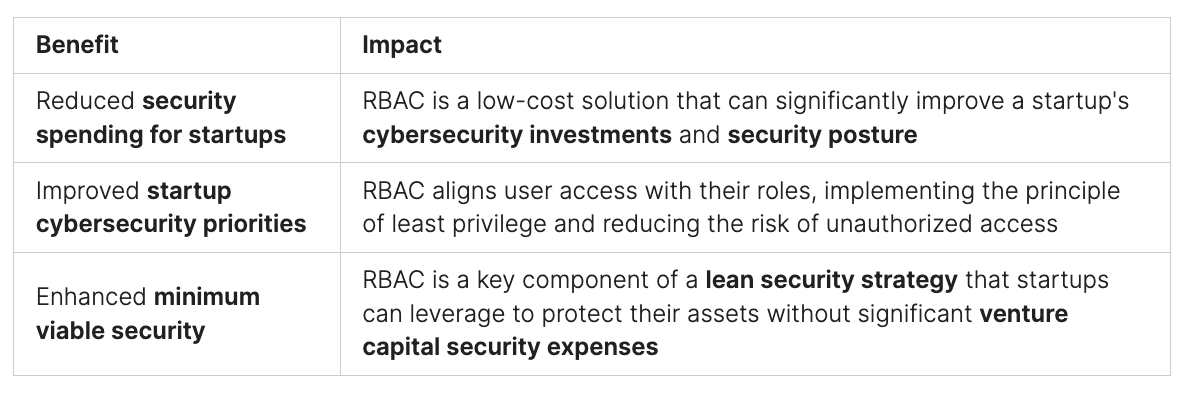
1. Leveraging Role-Based Access Control (RBAC)
When thinking about how much to spend on startup security, cybersecurity investments, and total security budget for startups, many overlook Role-Based Access Control (RBAC). This approach is a cost-effective way for startups to boost their security level. Yet it’s something often forgotten in security budgets for early-stage companies and seed funding security plans.
Instead of giving users the exact access they need, startups usually just give everyone admin rights. This makes things quicker and easier but not safe. The source points out that using RBAC to set specific access for each user takes less effort than fixing a cyber-attack from user accounts with too much access.
The advice for startups is clear, no matter their bootstrapped security finances or size. They should use RBAC. This will make their security level better and reduce the risk from accounts that have too much access.
When thinking about startup security spend, password management is key. The best option is a single sign-on (SSO) system. It lets employees use all their apps with just one login. This method cuts down on the chances for thieves to steal credentials.
SSO services, however, can be hard on the wallet and need a lot of resources. This makes it tough for early-stage companies with slim cybersecurity investments. Instead, password managers are a budget-friendlier choice. They create strong, unique passwords for each app and service. You only need to remember one master password to access them all. This strategy is smarter than using the same password for everything since it lowers the chances of being attacked.
Starting a business often means racing to make products while trying to bring in money. But, the importance of securing passwords shouldn’t be forgotten, no matter the budget. A good password manager can be a smart, money-saving choice for bootstrapped or venture-backed startups. It’s proof that you can increase your security without breaking the bank.
3. Embedding a Security-Conscious Culture
Startups must build a culture focused on security. This is key for strong cybersecurity planning. The culture not only shapes who joins. It also affects the values the team lives by and the choices they make daily.
Leaders must set a good example. They should show a deep commitment to security spending. This means being serious about investing in cybersecurity.
Leading by Example from the Top
Employees watch what their leaders do. When leaders make security a core value, the whole team follows. Leaders show security is a top concern by budgeting for it carefully. This moves the team to think the same way.
Consistent Cybersecurity Training Programs
Startups need to invest in training. This is part of the security budget. Everyone must know how to stay safe online. Such training confirms the company’s priority on cybersecurity.
Sprinto’s training programs are a good example. They help startups spread a security-focused mindset throughout their teams.
4. Monitoring, Detection, and Defense Strategies
As startups use the cloud more, their devices are key for smooth work. It’s important to put serious thought into startup security spend and cybersecurity investments. This means making sure monitoring, detection, and defense are top priorities in their lean security strategy.
Antivirus Software and Intrusion Detection
Their first step should be installing good antivirus software and setting up an intrusion detection system. These tools find and stop threats early, which is critical for protecting early-stage company security budgets and seed funding security allocation.
Log Management and Activity Tracking
On top of that, startups need log management and activity tracking to watch over their online tracks. Keeping an eye on what networks and users do helps catch and handle any dangers right away. This makes the risk of big costs from venture capital security expenses lower.
They should also look into compliance automation platforms like Sprinto. These help with tracking the rules and making sure you’re keeping up. Training workers to use strong and unique security spending for startups and bootstrapped security spending also goes a long way in making systems more secure.
5. Incident Response and Remediation Planning
In today’s fast-moving startup scene, cybersecurity investments and security spending for startups are tight. So, it’s critical to have a strong incident response and remediation plan. This is key even though putting effort into preventing and spotting issues is a must. Planning to fix problems is as vital. It helps early-stage companies deal with setbacks smartly, instead of reacting in chaos to every security incident.
To keep threats at bay and reduce the harm to their work, startups should invest in this area. A solid incident response and remediation plan shows that bootstrapped startups take cybersecurity priorities seriously. It doesn’t just safeguard their data and ideas. It also makes investors, big-business clients, and authorities trust them more.
Having a well-thought-out incident response and remediation plan is key for startups. It lets them catch problems early, take steps ahead of time, and lessen the impact of security snags. With this smart strategy and other low-cost cybersecurity measures, early-stage companies can boost their security. This prepares them for a bright future in the competitive startup world.
6. Following Best Cybersecurity Practices
Startups face threats beyond just financial loss. Cybercriminals aim at the valuable data they own. This info includes things like usernames, emails, and credit cards. If this gets out, it can badly hurt the startup’s future and how customers see it. So, it’s crucial for startup founders to not skip spending on security. It’s not just about money; it’s about protecting the company’s ideas, customer info, and image too.
Protecting Valuable Data Beyond Finances
Hackers don’t always go for money. Often, they want personal data that startups have. For startups, investing in strong data protection is critical, even if their budget is tight. They need to focus on keeping their info safe from hacks, no matter the cost of protection.
Startups can protect their info without spending too much. They can do this by focusing on the most important security steps first. These include training their staff, controlling who has access to their data, and planning how to handle any security emergencies. This creates a strong security culture that helps the company keep growing and doing well.
Conclusion
Startups may have limited budgets, but they can still effectively defend against cyber threats by implementing cost-effective cybersecurity practices. These measures are essential for maintaining security, demonstrating due diligence, and building trust with investors, large clients, and certification bodies.
Protecting data is crucial for startups, as they often hold valuable information and innovative ideas that make them prime targets for cybercriminals. Strategic budgeting for cybersecurity is vital for staying ahead of emerging threats and regulatory requirements. Wise investments in security can ensure ongoing protection and compliance.
Utilizing free security tools and ensuring regular security updates can establish a solid foundation. Additionally, fostering a workplace culture that prioritizes security is indispensable. Implementing password managers and automated compliance tools further enhances a startup’s security posture. These strategies not only safeguard the startup’s assets but also support sustainable growth in the digital landscape.
For comprehensive cybersecurity solutions tailored to your needs, visit Peris.ai Cybersecurity. Explore our range of products and services designed to protect your business and help you thrive in the ever-evolving cyber world. Don’t wait—secure your startup today with Peris.ai Cybersecurity.
FAQ
What are the major challenges startups face in managing cybersecurity risks?
Startups often struggle with limited staff and funds for strong cybersecurity. They focus more on their products and earning money. Due to this, security sometimes comes as an afterthought.
Why are startups prime targets for cyberattacks?
Less-funded companies face about 43% of all cyberattacks. Sadly, almost 60% of small businesses close after being attacked. Startup data and new ideas make them tempting for cybercriminals.
What are the key steps in developing an effective cybersecurity strategy for startups?
Startups need to learn about the cyberspace threats they face. It’s crucial they check their risks and digital profile. By knowing their security readiness, they can build a good security plan with limited resources.
What are some low-cost cybersecurity measures startups can implement?
Employee training on security is crucial. Using free security tools like multi-factor authentication and encryption is a smart move. It’s also important to regularly update software to fix bugs.
How can resource tagging improve security for startups?
Resource tagging helps figure out who’s responsible for a resource during a security threat. This quickens response times and cuts down on fixing time.
How can startups leverage Role-Based Access Control (RBAC) to enhance their security?
Startups often make everyone an admin to save time. But, this makes their systems less secure. Enabling RBAC is easy and better than dealing with a security breach.
What are the options for startups to manage passwords cost-effectively?
While a single sign-on (SSO) would be great, it can be too expensive. Password managers, which are cheaper, offer a good alternative. They create and store unique passwords, keeping accounts safe.
How can startups embed a security-conscious culture?
Leaders must show security matters by their actions. They should encourage staff with consistent training on security. This helps teach employees how to keep the business safe.
What monitoring, detection, and defense strategies should startups implement?
Startups should use antivirus software and have an intrusion detection system. Keeping logs of network activities is essential. They should also look into a compliance platform to stay in line with regulations.
Why is incident response and remediation planning crucial for startups?
Planning for fixing security issues is vital for startups. It helps them deal with problems more calmly. This approach lets them avoid the chaos that can follow a security incident.
Why is it important for startups to follow best cybersecurity practices?
There’s a myth that hackers only want money. In truth, they often target valuable data. Keeping this data safe is key to a startup’s good name and future.
In today’s digital era, webcam security remains a pertinent concern, highlighting the need for physical privacy measures. A recent discovery involving the manipulation of webcam firmware on older laptops such as the Lenovo ThinkPad X230 reveals that covering your webcam is more than just a precaution—it’s a necessary defense against sophisticated cyber threats.
The Vulnerability of Webcams
Internal USB Connections:
Exposure: Many laptop webcams are connected via USB, which can be exploited to flash custom firmware. This manipulation allows hackers to control the webcam’s LED, facilitating covert operations without triggering the usual visual alerts.
Example: The ThinkPad X230, a model over a decade old, demonstrated that its webcam firmware could be rewritten to operate the camera independently from the LED indicator.
Software-Controlled LEDs:
Misconception: It’s commonly believed that webcam LEDs are directly connected to the camera’s power supply. However, in many devices, the LED operation is software-controlled, providing an opportunity for hackers to deactivate it while the webcam remains active.
Exploitation Techniques
Firmware Manipulation:
Method: By reflashing the firmware of the USB-connected webcam, attackers can take control over the camera functions, bypassing physical security measures like LED indicators.
Impact: This vulnerability primarily affects older devices that lack modern firmware validation mechanisms.
Proof-of-Concept:
Demonstration: A security engineer showcased how an outdated ThinkPad X230’s firmware could be altered, serving as a stark reminder that older technology can host enduring vulnerabilities.
Modern Devices:
Not Fully Protected: Despite advancements like digital signature checks in newer laptops, some models still permit software-based control over LED indicators, posing ongoing risks.
Protective Measures for Enhanced Privacy
Physical Security:
Webcam Covers: Employing a simple sticker or a sliding cover can physically block unauthorized camera access.
Hardware Switches: Selecting devices with physical switches for webcams and microphones provides a reliable security layer.
Technology Updates:
Firmware Upgrades: Keeping your device’s firmware up-to-date is crucial for defending against known exploits.
Device Preferences: Opt for laptops that feature secure firmware update processes and hardware-based LED indicators.
Practical Tips:
Disable Unnecessary Access: Limit webcam access to applications only when it is essential.
Regular Updates: Continuously update your device to patch any vulnerabilities that could be exploited.
The Significance of Webcam Security
The potential for webcams to be exploited by cybercriminals underscores the importance of taking proactive steps to protect your privacy. By understanding the technical vulnerabilities and implementing both physical and software safeguards, you can significantly mitigate the risk of unauthorized surveillance.
Conclusion
Covering your webcam and staying informed about device security are not signs of paranoia but are practical, necessary measures in our increasingly surveilled world. For comprehensive cybersecurity solutions and the latest protective strategies, visit Peris.ai.
Your Peris.ai Cybersecurity Team #YouBuild #WeGuard