Category: Article

  • Malware Detection in Mobile: Myths vs. Reality

    Malware Detection in Mobile: Myths vs. Reality

    Mobile security is a growing concern in today’s digital landscape. With the increasing use of smartphones and the vast amounts of sensitive data stored on these devices, the risk of mobile malware has become a top priority for organizations. Malicious attacks, such as ransomware, spyware, and Trojan horses, can have severe consequences, including data theft, operational disruptions, and compromised device security.

    In this article, we will explore the myths and the reality of malware detection in mobile devices. We will delve into the various types of mobile malware, the threats they pose, and the strategies organizations can implement to safeguard their smartphones. By debunking common myths and shedding light on effective detection techniques, we aim to provide valuable insights into the ever-evolving field of mobile security.

    Key Takeaways:

    • Mobile devices are vulnerable to various types of malware, including ransomware, spyware, and Trojan horses.
    • Malicious attacks can lead to data theft, operational disruptions, and compromised device security.
    • Understanding the threats of mobile malware is crucial for organizations to implement effective detection strategies.
    • Android devices are particularly vulnerable due to the open-source nature of the operating system.
    • Google has taken steps to enhance Android security through monthly security patches and Google Play Protect.

    The Threat of Mobile Malware

    Mobile malware has evolved into sophisticated forms, capable of causing significant damage to organizations of all sizes. It can be distributed via various tactics such as phishing, smishing (SMS phishing), and infected apps. Common types of mobile malware include spyware, ransomware, and Trojan horses. These threats can result in data breaches, financial losses, and reputational damage.

    Mobile malware is a growing concern due to the widespread use of smartphones and tablets in both personal and professional settings. The increasing reliance on mobile devices for communication, online transactions, and data storage has made them attractive targets for cybercriminals.

    Distribution Tactics

    “Attackers employ various tactics to distribute mobile malware and target unsuspecting users. Phishing emails and text messages are commonly used to trick users into revealing sensitive information or downloading malicious apps. They often impersonate legitimate organizations or individuals to gain the trust of their targets.”

    Once a user falls victim to a phishing attack, they may unknowingly install malware on their device. These malicious apps can then gain unauthorized access to personal information, monitor user activities, and even lock devices until a ransom is paid.

    Types of Mobile Malware

    Several types of mobile malware can infect devices and compromise security:

    • Spyware: This type of malware is designed to spy on users and gather sensitive information such as passwords, banking credentials, and personal data.
    • Ransomware: Ransomware locks users out of their devices or encrypts their files until a ransom is paid. It can cause significant financial losses and disrupt business operations.
    • Trojan horses: Trojan horses appear as legitimate applications but contain hidden malicious code. They can compromise device security and steal sensitive information.

    Mobile malware poses serious risks to individuals and organizations, including:

    • Data breaches and loss of sensitive information
    • Financial losses due to unauthorized transactions or ransom payments
    • Reputational damage and loss of customer trust
    • Disruption of business operations

    Individuals and organizations must take proactive measures to protect against mobile malware. Implementing robust security measures, such as using reputable antivirus software, practicing safe browsing habits, and updating devices regularly, can help mitigate the risks associated with mobile threats.

    Real-World Examples

    “In 2020, a major mobile malware attack targeted Android users in Southeast Asia, infecting millions of devices. The malware, known as ‘Agent Smith,’ disguised itself as a legitimate app and then replaced installed apps with malicious versions.”

    This widespread attack highlights the severity of the mobile malware threat and the need for stronger security measures. Organizations must stay vigilant and keep abreast of the latest mobile malware trends to safeguard their data and devices.

    Type of Mobile Malware Description Spyware Designed to spy on users and gather sensitive information such as passwords and personal data Ransomware Locks users out of their devices or encrypts their files until a ransom is paid Trojan horses Appear as legitimate applications but contain hidden malicious code

    Detecting Mobile Malware on Android Devices

    Android devices are particularly vulnerable to malware due to the open-source nature of the operating system and the fragmented ecosystem. It is essential for users and IT professionals to be able to detect malware on Android devices to ensure their security and protect against potential threats.

    Several signs indicate the presence of malware on an Android device. Users may notice a sudden increase in data usage without any apparent reason. This could be due to malware running in the background and transferring data without the user’s knowledge or consent.

    Another red flag is unexpected app installations. If new apps appear on your device without your consent or if you did not intentionally download them, malware may be responsible for these installations.

    Unfamiliar ads or pop-ups that appear frequently on your device can also be a clear indication of malware. These ads often disrupt your browsing experience and can be difficult to close or remove.

    Malware can also significantly impact the performance of your Android device. If you notice a sudden decrease in speed, frequent freezes, or crashes, it could be a sign that malware is affecting the device’s functionality.

    To detect and remove malware from Android devices, users and IT professionals can follow these steps:

    1. Utilize mobile threat detection tools: There are various mobile security apps available that can scan your device for malware and alert you to any potential threats. These tools analyze the device for suspicious behavior, identify malicious apps, and help in their removal.
    2. Enforce security policies through Mobile Device Management (MDM): IT professionals can leverage MDM solutions to enforce security policies, remotely monitor devices, and detect any anomalies that may indicate malware infections. MDM allows for granular control and helps in preventing unauthorized app installations and other risky activities.
    3. Uninstall suspicious apps: If you suspect that a particular app is malware-infected, it is essential to uninstall it from your device immediately. Look for apps that you did not install or that have suspicious permissions or behavior.

    By taking these steps, Android users can effectively detect and remove malware from their devices, ensuring a safer mobile experience.

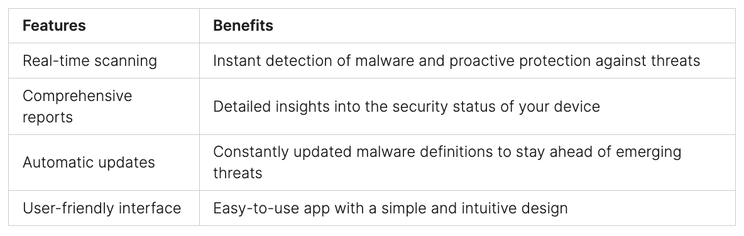
    To further illustrate the process of detecting malware on Android devices, here is an actual example of a mobile threat detection tool in action:

    “Using our advanced mobile security app, you can scan your Android device for malware and other security threats in just a few taps. The app thoroughly examines your device’s files, apps, and settings to detect any signs of malicious activity. It provides real-time alerts and comprehensive reports, allowing you to take immediate action and remove any detected malware.”

    Example: Mobile Threat Detection Tool
    Mobile Malware Prevention Measures

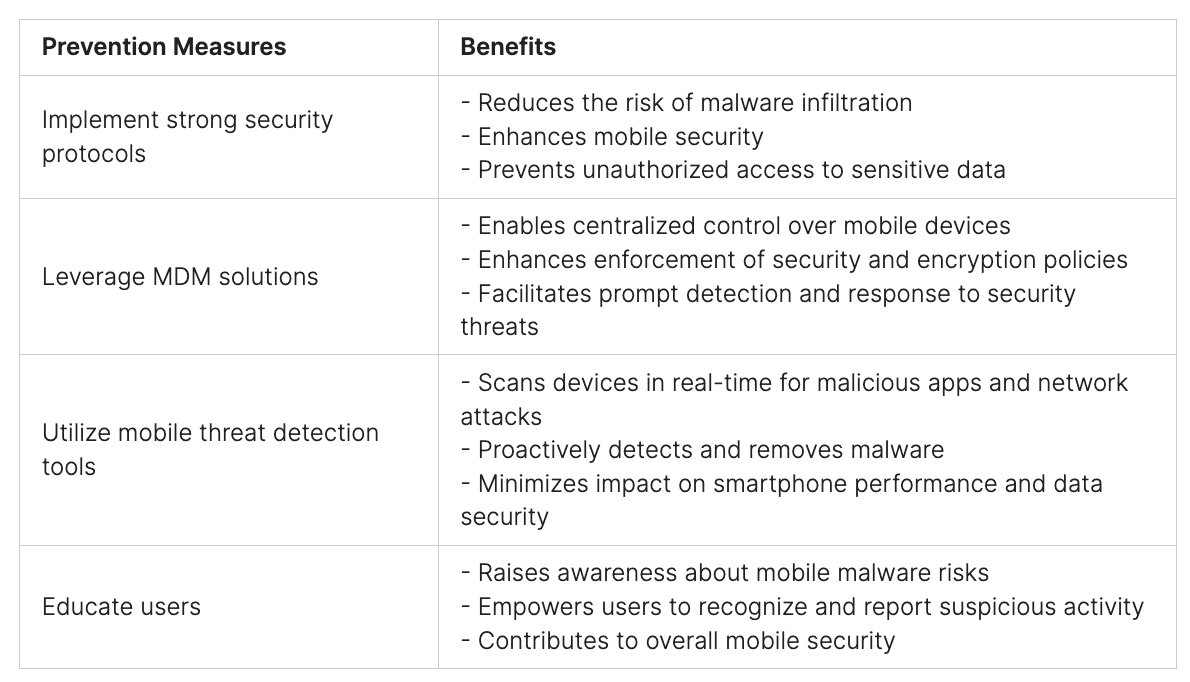
    Effective mobile security requires organizations to implement robust prevention measures to safeguard against malware threats. By adopting strong security protocols, leveraging mobile device management (MDM) solutions, and utilizing mobile threat detection tools, organizations can enhance smartphone protection and mitigate the risks associated with mobile malware.

    Implement Strong Security Protocols

    Authentication and authorization requirements play a crucial role in preventing mobile malware infections. By enforcing stringent access controls, organizations can ensure that only authorized users can access sensitive data and applications on smartphones. This reduces the risk of malware infiltration and unauthorized access, enhancing overall mobile security.

    Leverage Mobile Device Management (MDM) Solutions

    MDM solutions provide organizations with centralized control over mobile devices, enabling the enforcement of security and encryption policies. These solutions allow admins to remotely manage and monitor devices, ensuring compliance with security standards. With MDM, organizations can detect and respond to potential security threats promptly, safeguarding smartphones from malware attacks.

    Utilize Mobile Threat Detection Tools

    Mobile threat detection tools are designed to scan devices in real time for malicious apps and network attacks. These tools employ advanced algorithms and machine-learning techniques to identify potential malware infections. Real-time scanning helps organizations proactively detect and remove malware, minimizing the impact on smartphone performance and data security.

    Educate Users about Recognizing and Reporting Suspicious Activity

    Human error can often lead to malware infections on smartphones. Therefore, educating users about the risks associated with mobile malware and the importance of practicing safe browsing habits is crucial. Users should be aware of the signs of malware infection and understand how to report suspicious activity to IT or security teams promptly. This proactive approach empowers users to contribute to mobile security and prevent malware incidents.

    “Prevention is better than cure. By implementing strong security protocols, leveraging MDM solutions, utilizing mobile threat detection tools, and educating users, organizations can effectively safeguard their smartphones from malware threats.”
    Google’s Efforts to Improve Android Security

    Android security is a top priority for Google, and the company has implemented various measures to enhance the security of the Android operating system. These efforts aim to protect users from mobile malware and address the vulnerabilities associated with Android devices.

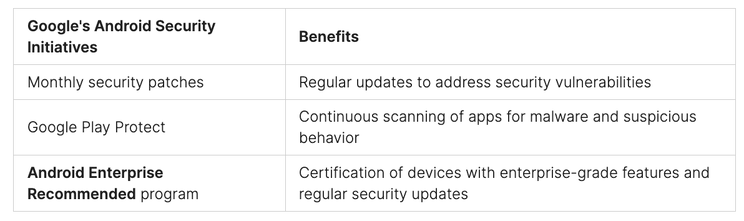
    One significant step taken by Google is the provision of monthly security patches. These patches ensure that Android devices receive regular updates to fix security vulnerabilities and protect against emerging threats.

    To further strengthen Android security, Google introduced Google Play Protect. This comprehensive security service is built into Google Play, the official app store for Android. Google Play Protect continuously scans apps downloaded from the store, looking for any signs of malware or suspicious behavior. This proactive approach helps to keep Android devices safe and secure.

    Additionally, Google launched the Android Enterprise Recommended program. This program certifies devices that meet Google’s stringent requirements for enterprise-grade features and regular security updates. By recommending devices that adhere to these standards, Google aims to provide businesses with reliable and secure Android devices for their workforce.

    The efforts made by Google to improve Android security have had a significant impact on mobile device security overall. These initiatives demonstrate Google’s commitment to ensuring the safety of Android users and creating a secure environment for mobile applications.
    By implementing these measures, Google has significantly enhanced the security of the Android operating system and provided users with a safer mobile experience. Android users can now enjoy the benefits of a robust security framework, ensuring protection against mobile malware and other security threats.

    Steps to Remove Mobile Malware from Android Devices

    If a device is infected with malware, users, and admins can take several steps to remove it. Here are the recommended actions:

    1. Utilize mobile threat detection tools: These tools can help identify and eliminate malware from Android devices effectively. They scan the device for malicious apps and provide insights into potential infections.
    2. Enforce security policies through MDM: Mobile Device Management (MDM) solutions can be used to enforce security policies on Android devices. By disabling app installations from unknown sources, organizations can prevent further malware infections.
    3. Uninstall suspicious apps: Users should uninstall any apps that appear suspicious or have unknown origins. These apps might be the source of malware. It is crucial to regularly review and remove unwanted or suspicious apps from Android devices.
    4. Keep Android devices up to date: Keeping devices up to date with the latest security patches is essential for protecting against malware. Regularly check for system updates and install them promptly to ensure the latest security measures are in place.
    5. Consider a factory reset: In extreme cases where malware persists despite taking preventive measures, performing a factory reset may be necessary. However, this should be the last resort, as it erases all data and settings on the device. Before performing a factory reset, it is recommended to back up important data and consult with IT professionals.

    By following these steps, users can effectively remove mobile malware from their Android devices and ensure a secure mobile experience.

    Removing mobile malware from Android devices is crucial for maintaining device security and protecting sensitive data.

    Best Practices for Ransomware Detection and Prevention

    Ransomware poses a significant threat in the mobile security landscape. Detecting and preventing ransomware attacks early is crucial to minimizing the potential damage.

    To effectively respond to and mitigate the impact of ransomware attacks, organizations should implement a robust incident response plan. This plan should include the following best practices:

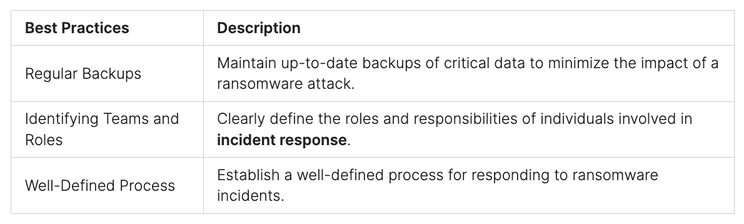
    1. Regular Backups: Maintain up-to-date backups of critical data to minimize the impact of a ransomware attack. These backups should be stored securely and offline to prevent them from being affected by the attack.
    2. Identifying Teams and Roles: Clearly define the roles and responsibilities of individuals involved in incident response. This includes designating specific teams for detection, analysis, containment, and communication.
    3. Well-Defined Process: Establish a well-defined process for responding to ransomware incidents. This process should outline the necessary steps to be taken, including isolating affected systems, investigating the extent of the attack, and notifying the appropriate parties.

    By implementing these best practices, organizations can enhance their ransomware detection and prevention capabilities, minimizing the potential damage caused by these malicious attacks.

    Best Practices for Ransomware Detection and Prevention
    Importance of Monitoring and Response to Mobile Threats

    Effective mobile security requires proactive monitoring and swift incident response to address potential threats. By utilizing mobile threat monitoring tools and establishing an incident response plan, organizations can enhance their defense against mobile malware and safeguard their sensitive data.

    Mobile threat monitoring enables real-time detection of potential malware infections and network attacks on mobile devices. With continuous monitoring and analysis of device logs, organizations can identify and prioritize incidents for immediate action. This proactive approach ensures timely threat detection and response, minimizing the potential impact of mobile threats.

    Having a well-defined incident response plan is vital in mitigating the risks posed by mobile threats. The plan should outline roles and responsibilities, communication procedures, and steps to be taken in the event of a security incident. By establishing clear guidelines and protocols, organizations can swiftly respond to and contain mobile threats, preventing further compromise of their mobile security.

    Benefits of Mobile Threat Monitoring and Incident Response:

    • Real-time Detection: Mobile threat monitoring tools provide continuous monitoring, offering real-time insights into potential malware infections and network attacks.
    • Swift Response: An incident response plan enables organizations to promptly identify, analyze, and mitigate the impact of mobile threats, minimizing operational disruptions and data breaches.
    • Timely Threat Detection: Regular monitoring, analysis of logs, and prioritization of incidents facilitate early detection and response to mobile threats, preventing their escalation.
    • Data Protection: Proactive monitoring and incident response measures help safeguard sensitive data on mobile devices, ensuring compliance with data protection regulations.

    “Continuous monitoring and swift incident response are key components of an effective mobile security strategy. By implementing robust mobile threat monitoring practices and having an incident response plan in place, organizations can proactively protect their mobile devices and mitigate the impact of potential mobile threats.”

    In summary, mobile threat monitoring and incident response are vital in maintaining mobile security. These proactive measures enable organizations to detect and respond to potential malware infections and network attacks in real time, minimizing the impact on their operations and data. By prioritizing threat detection, establishing a comprehensive incident response plan, and utilizing relevant tools, organizations can effectively safeguard their mobile devices and protect against evolving mobile threats.

    Planning for a Ransomware Attack on Mobile Devices

    Organizations must prioritize mobile security planning to ensure they are well-prepared for a potential ransomware attack on their mobile devices. By implementing a comprehensive incident response plan and integrating automation tools, organizations can effectively minimize the impact of such attacks. The following key strategies can aid in planning and executing an efficient ransomware incident response:

    1. Ensure Offline Backups: Regularly back up critical data and store it offline to prevent ransomware encryption and ensure data recovery in case of an attack.
    2. Identify Teams and Roles: Clearly define the teams and roles responsible for handling a ransomware incident, including IT personnel, security analysts, legal advisors, and management representatives.
    3. Integrate Automation Tools: Leverage automation tools and security technologies to enhance incident response efficiency and reduce response times.
    4. Utilize Asset Management Solutions: Implement asset management solutions to track system owners and applications, helping identify potential vulnerabilities and respond promptly to ransomware incidents.
    5. Employ Threat Intelligence: Utilize comprehensive threat intelligence to stay updated on the latest ransomware trends, techniques, and indicators of compromise.
    6. Develop Breach Response Playbooks: Create detailed breach response playbooks that outline step-by-step procedures for responding to ransomware incidents, ensuring a systematic and efficient response.

    By following these proactive measures, organizations can enhance their readiness to tackle ransomware attacks on mobile devices and effectively safeguard their critical data and systems.

    Conclusion

    Effectively tackling mobile malware demands a multifaceted approach, blending robust security protocols with advanced detection tools and informed user practices. Ensuring smartphone security in organizational settings is not just about the tools and technologies employed; it also hinges on demystifying common misconceptions about mobile threats and adopting concrete, proactive measures.

    Key to this strategy is the enforcement of stringent security protocols. Organizations should prioritize strict authentication and authorization measures, leverage mobile device management (MDM) solutions, and focus on educating users about identifying and reporting suspicious activities. These steps form a layered defense against mobile malware incursions, acting as critical barriers to potential breaches.

    Equally vital in this cybersecurity equation are mobile threat detection tools. Such technologies play an indispensable role by scanning devices in real-time, rooting out malicious applications, and offering instant insights into possible malware infiltrations and network threats. Regular monitoring and response planning, in conjunction with ongoing collaboration with cybersecurity experts, further empowers organizations to maintain a proactive and resilient stance in the face of mobile security challenges.

    Peris.ai Cybersecurity provides a comprehensive solution to these challenges with our product, Peris.ai Brahma Mobile Endpoint Detection Response (MEDR). Our key features include Log Collector, Command Execution, File Integrity Monitoring (FIM), Security Configuration Assessment (SCA), System Inventory, Malware Detection, Active Response, and Container Security Monitoring. These features are designed to offer thorough protection and proactive management of mobile security threats.

    By integrating strong security practices, leveraging cutting-edge mobile threat detection tools like Peris.ai Brahma, and cultivating a culture of cybersecurity awareness, organizations can effectively combat the scourge of mobile malware. Visit Peris.ai Cybersecurity to explore how our solutions can bolster your mobile security and help you navigate the complex cybersecurity landscape with confidence and sophistication.

    FAQ

    What are some common types of mobile malware?

    Common types of mobile malware include spyware, ransomware, and Trojan horses.

    How can I detect malware on my Android device?

    Signs of malware infection on Android devices may include high data usage, unexpected app installations, unfamiliar ads or pop-ups, and degraded performance.

    Are there any free ways to check for malware on Android?

    Mobile threat detection tools can help detect and remove malware from Android devices. Some of these tools are available for free.

    What preventive measures can I take to protect my smartphone from malware?

    Implementing strong security protocols, utilizing mobile threat detection tools, and educating users are crucial preventive measures to protect smartphones from malware.

    What efforts has Google made to improve Android security?

    Google provides monthly security patches, Google Play Protect for scanning apps for malware, and the Android Enterprise Recommended program to enhance Android security.

    How can I remove malware from my Android device?

    Utilizing mobile threat detection tools, enforcing security policies through mobile device management (MDM), and uninstalling suspicious apps can help remove malware from Android devices.

    How can I detect and prevent ransomware attacks on my mobile device?

    Implementing intelligent security analytics, regular backups, and having a well-defined incident response plan is key to detecting and preventing ransomware attacks on mobile devices.

    Why is monitoring and responding to mobile threats important?

    Monitoring and responding to mobile threats in real time help maintain mobile security and minimize the potential impact of malware attacks.

    How should I plan for a ransomware attack on my mobile devices?

    Planning for a ransomware attack includes ensuring offline backups, identifying teams and roles for incident response, and integrating automation tools for faster response times.

    Are there any real-world examples of successful mobile malware mitigation?

    Organizations have partnered with cybersecurity providers to strengthen their defenses against mobile threats, utilizing advanced security solutions and enhancing threat intelligence.

    What are the main takeaways from mobile malware detection and prevention?

    By implementing strong security protocols, utilizing mobile threat detection tools, and educating users, organizations can effectively safeguard their smartphones and mitigate the impact of mobile malware attacks.

  • QR Codes: A New Gateway for Scammers? Unpacking the Latest Phishing Trend!

    QR Codes: A New Gateway for Scammers? Unpacking the Latest Phishing Trend!

    In the ever-evolving realm of digital security, QR codes, a ubiquitous tool for everything from digital payments to restaurant menus, are now being exploited in sophisticated phishing schemes. Concerning the trend in phishing campaigns that utilize QR codes to deceive users. This article explores the mechanics of these QR code phishing attacks, their effectiveness, and provides practical advice on safeguarding against such threats.

    Understanding QR Code Phishing Scams

    The Convenience and the Risk: QR codes have become a staple in our digital lives, celebrated for their convenience and efficiency. However, this convenience also opens up new avenues for cybercriminals to craft more deceptive phishing attacks.

    How QR Code Phishing Works:

    • Deceptive Emails: Cybercriminals send emails mimicking legitimate communications from well-known companies, complete with logos and personalized details. These emails often warn that the user’s account authentication is expiring and prompt immediate re-authentication to avoid service interruption.
    • Malicious QR Codes: The emails include a QR code that, when scanned, redirects the user to a fake website designed to harvest personal and financial information.
    • Urgency as a Tool: By creating a sense of urgency, these emails push the recipient to act swiftly—often bypassing their usual security checks.

    Why Are QR Codes Effective for Phishing?

    Familiarity Breeds Complacency: The widespread adoption of QR codes, especially in the context of digital payments and public health measures, has normalized their use. Unfortunately, this familiarity can lead users to let their guard down, making QR codes an effective tool for phishing.

    Exploiting Digital Payment Trends: In regions like India, where digital payments are prevalent, the use of QR codes is particularly common, further enhancing the effectiveness of QR code phishing attacks.

    ️ Strategies to Protect Yourself from QR Code Phishing

    Critical Vigilance with Urgent Communications:

    • Treat any communication that instills a sense of urgency with heightened suspicion, especially if it asks you to scan a QR code or provide personal information.

    Sender Verification:

    • Always verify the authenticity of the sender through independent means. Check for any discrepancies in email addresses, grammar, or logo placement that might betray a phishing attempt.

    Education and Awareness:

    • Stay informed about the latest phishing tactics and educate those around you. Awareness is your first line of defense against emerging cyber threats.

    Conclusion: Your Defense Against QR Code Phishing

    QR code phishing represents a significant and sophisticated threat, leveraging both technology and psychology to ensnare victims. By understanding the nature of these attacks and adopting a cautious and questioning approach to QR code scans, especially from unsolicited sources, you can protect yourself from potential harm.

    Visit Peris.ai for more insights and resources on maintaining digital safety in an increasingly connected world.

    Stay vigilant, stay informed, and secure your digital presence with Peris.ai Cybersecurity.

    Your Peris.ai Cybersecurity Team

  • Startup Security 101: 6 Ways to Protect Your Venture With Minimal Spend!

    Startup Security 101: 6 Ways to Protect Your Venture With Minimal Spend!

    In the world of startups, speed, and growth matter a lot. But often, cybersecurity doesn’t get enough focus. With startups facing limits in both staff and money, protecting their business well seems tough. The good news? You can keep your startup safe without spending too much. It just takes smart moves and the right strategies for startup security on a budget.

    Key Takeaways

    • Startups can find cost-effective ways to enhance their cybersecurity posture by focusing on “low-hanging fruit” – steps that are inexpensive but highly impactful.
    • Understanding the cybersecurity landscape and assessing an organization’s needs are crucial first steps in developing an effective security strategy, especially for startups with limited resources.
    • Startups possess valuable data and ideas that make them attractive targets for cybercriminals, underscoring the importance of prioritizing cybersecurity.
    • Embedding a security-conscious culture within a startup, with leaders setting the tone and providing consistent training, can significantly improve overall security.
    • Implementing a robust incident response and remediation plan is a low-cost investment that can help startups stay ahead of potential security breaches and minimize their impact.

    The Importance of Cybersecurity for Startups

    Startups often focus more on growth than on cybersecurity, thinking it’s not urgent. Yet, not securing their digital information can be very costly. Startups with low-security spending and few resources are high on hackers’ lists. About 43% of cyberattacks target these underfunded companies. And sadly, nearly 60% of them close within six months of being attacked.

    Limited Resources Make Startups Prime Targets

    Startups face big challenges with cybersecurity, no matter how far along they are. They usually can’t afford to protect their systems as well as they’d like. Because of this, they become easy prey for hackers wanting to steal their data. Having a small security budget and a lean security strategy makes startups more vulnerable. This is because they appear weaker, inviting cybercriminals to attack them.

    The High Cost of Cyberattacks on Small Businesses

    If a startup gets hit by a cyberattack, it can hurt them. They might not recover from the financial and reputational harm. Shockingly, almost 60% shut down within six months of a breach. This is why having at least minimum viable security is crucial for startups. It helps protect key startup cybersecurity priorities like customer data and intellectual property. Doing so keeps their trust, brand, and long-term venture capital security expenses secure.

    Planning a Cybersecurity Strategy on a Budget

    Startups often find it hard to balance risk and resources. They must secure data without using up all their funds. It’s important to focus on cybersecurity investments wisely. By doing so, they can protect their business well, without overspending. The goal is to focus on what’s most important, create a smart plan, and start with a basic, but effective, security setup.

    Understanding Your Cyber Threat Landscape

    The first step in planning for security is to know your risks. It means looking at what threats your type of business is likely to face. This involves looking at what similar companies spend on security. This helps to focus on the most common security issues and spend your money wisely.

    Assessing Your Digital Footprint and Risks

    Next, you need to check how much you’re exposed online and where. This means looking at your website, social media, and more. It’s important to know what a security breach could mean for your business. Knowing this helps to decide where to put your security budget.

    Evaluating Your Cybersecurity Maturity Level

    Understanding how ready your security measures are is crucial. This step shows where your security strengths and weaknesses lie. It helps to better spend your budget. This ensures you are making the best decisions for your startup.

    Designing a Lean Cybersecurity Architecture

    After knowing your risks and current security level, it’s time to act. Focus on building a simple but effective security plan. This method aims to do what’s necessary and nothing extra. It saves money and boosts security where it’s needed most. that effectively addresses their unique startup cybersecurity priorities and security spending constraints, ultimately enhancing their overall resilience and protecting their valuable assets.

    Low-Cost Cybersecurity Measures for Startups

    Startups can boost their security even on a tight budget. They can start by training their staff to spot and avoid phishing scams. This step helps decrease the risk of cyberattacks. Also, they can use free security options like multi-factor authentication and encryption. These help without costing extra.

    Employee Security Awareness Training

    Phishing is a big issue for startup security. But with the right training, employees can learn to beat these tricks. This not only saves money but also shields the startup from cyber threats. It protects their startup security spend and early-stage company security budget.

    Enabling Free Security Features

    Free tools like multi-factor authentication are available from many services. These tools help protect vital startup data without more costs. Startups can thus build a strong security base without heavy spending. It’s key for security spending for startups and bootstrapped security spending.

    Implementing a Patching Routine

    Keeping software up-to-date is crucial, even for small businesses. Regular patches can help prevent cyberattacks and protect data. This approach strengthens the startup’s security measures, safeguarding their startup cybersecurity priorities.

    The Role of Resource Tagging in Security

    In today’s startup security spend world, resource tagging has become a key player. It’s known for being both low-cost and very effective. Experts say adding labels to resources is crucial for startups with venture capital security expenses constraints. Tagging helps these early companies improve their security a lot.

    When you tag your resources clearly, it’s easy to see who manages them. This is super helpful when there’s a security issue. Knowing this quickly can decrease the time it takes to fix a problem. It’s all about getting things done fast, a big deal in startup cybersecurity priorities.

    Also, tagging is seen as a smart, basic part of a security plan. It’s a key for security spending for startups and bootstrapped security spending. With tagging, you’re setting up a lean security strategy beautifully.

    Resource tagging doesn’t have to cost a lot. It can help startups do more with less, improving their security step by step. This approach fits well with the thinking of those who focus on their startup security spend and cybersecurity investments. It’s keeping in mind what’s best for their business.

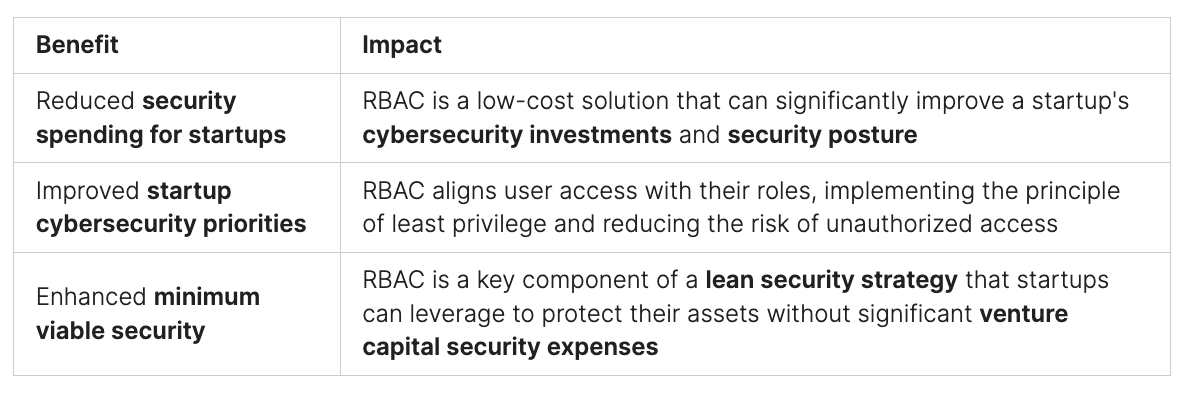
    1. Leveraging Role-Based Access Control (RBAC)

    When thinking about how much to spend on startup security, cybersecurity investments, and total security budget for startups, many overlook Role-Based Access Control (RBAC). This approach is a cost-effective way for startups to boost their security level. Yet it’s something often forgotten in security budgets for early-stage companies and seed funding security plans.

    Instead of giving users the exact access they need, startups usually just give everyone admin rights. This makes things quicker and easier but not safe. The source points out that using RBAC to set specific access for each user takes less effort than fixing a cyber-attack from user accounts with too much access.

    The advice for startups is clear, no matter their bootstrapped security finances or size. They should use RBAC. This will make their security level better and reduce the risk from accounts that have too much access.

    2. Startup Security Spend: Password Management Solutions

    When thinking about startup security spend, password management is key. The best option is a single sign-on (SSO) system. It lets employees use all their apps with just one login. This method cuts down on the chances for thieves to steal credentials.

    SSO services, however, can be hard on the wallet and need a lot of resources. This makes it tough for early-stage companies with slim cybersecurity investments. Instead, password managers are a budget-friendlier choice. They create strong, unique passwords for each app and service. You only need to remember one master password to access them all. This strategy is smarter than using the same password for everything since it lowers the chances of being attacked.

    Starting a business often means racing to make products while trying to bring in money. But, the importance of securing passwords shouldn’t be forgotten, no matter the budget. A good password manager can be a smart, money-saving choice for bootstrapped or venture-backed startups. It’s proof that you can increase your security without breaking the bank.

    3. Embedding a Security-Conscious Culture

    Startups must build a culture focused on security. This is key for strong cybersecurity planning. The culture not only shapes who joins. It also affects the values the team lives by and the choices they make daily.

    Leaders must set a good example. They should show a deep commitment to security spending. This means being serious about investing in cybersecurity.

    Leading by Example from the Top

    Employees watch what their leaders do. When leaders make security a core value, the whole team follows. Leaders show security is a top concern by budgeting for it carefully. This moves the team to think the same way.

    Consistent Cybersecurity Training Programs

    Startups need to invest in training. This is part of the security budget. Everyone must know how to stay safe online. Such training confirms the company’s priority on cybersecurity.

    Sprinto’s training programs are a good example. They help startups spread a security-focused mindset throughout their teams.

    4. Monitoring, Detection, and Defense Strategies

    As startups use the cloud more, their devices are key for smooth work. It’s important to put serious thought into startup security spend and cybersecurity investments. This means making sure monitoring, detection, and defense are top priorities in their lean security strategy.

    Antivirus Software and Intrusion Detection

    Their first step should be installing good antivirus software and setting up an intrusion detection system. These tools find and stop threats early, which is critical for protecting early-stage company security budgets and seed funding security allocation.

    Log Management and Activity Tracking

    On top of that, startups need log management and activity tracking to watch over their online tracks. Keeping an eye on what networks and users do helps catch and handle any dangers right away. This makes the risk of big costs from venture capital security expenses lower.

    They should also look into compliance automation platforms like Sprinto. These help with tracking the rules and making sure you’re keeping up. Training workers to use strong and unique security spending for startups and bootstrapped security spending also goes a long way in making systems more secure.

    5. Incident Response and Remediation Planning

    In today’s fast-moving startup scene, cybersecurity investments and security spending for startups are tight. So, it’s critical to have a strong incident response and remediation plan. This is key even though putting effort into preventing and spotting issues is a must. Planning to fix problems is as vital. It helps early-stage companies deal with setbacks smartly, instead of reacting in chaos to every security incident.

    To keep threats at bay and reduce the harm to their work, startups should invest in this area. A solid incident response and remediation plan shows that bootstrapped startups take cybersecurity priorities seriously. It doesn’t just safeguard their data and ideas. It also makes investors, big-business clients, and authorities trust them more.

    Having a well-thought-out incident response and remediation plan is key for startups. It lets them catch problems early, take steps ahead of time, and lessen the impact of security snags. With this smart strategy and other low-cost cybersecurity measures, early-stage companies can boost their security. This prepares them for a bright future in the competitive startup world.

    6. Following Best Cybersecurity Practices

    Startups face threats beyond just financial loss. Cybercriminals aim at the valuable data they own. This info includes things like usernames, emails, and credit cards. If this gets out, it can badly hurt the startup’s future and how customers see it. So, it’s crucial for startup founders to not skip spending on security. It’s not just about money; it’s about protecting the company’s ideas, customer info, and image too.

    Protecting Valuable Data Beyond Finances

    Hackers don’t always go for money. Often, they want personal data that startups have. For startups, investing in strong data protection is critical, even if their budget is tight. They need to focus on keeping their info safe from hacks, no matter the cost of protection.

    Startups can protect their info without spending too much. They can do this by focusing on the most important security steps first. These include training their staff, controlling who has access to their data, and planning how to handle any security emergencies. This creates a strong security culture that helps the company keep growing and doing well.

    Conclusion

    Startups may have limited budgets, but they can still effectively defend against cyber threats by implementing cost-effective cybersecurity practices. These measures are essential for maintaining security, demonstrating due diligence, and building trust with investors, large clients, and certification bodies.

    Protecting data is crucial for startups, as they often hold valuable information and innovative ideas that make them prime targets for cybercriminals. Strategic budgeting for cybersecurity is vital for staying ahead of emerging threats and regulatory requirements. Wise investments in security can ensure ongoing protection and compliance.

    Utilizing free security tools and ensuring regular security updates can establish a solid foundation. Additionally, fostering a workplace culture that prioritizes security is indispensable. Implementing password managers and automated compliance tools further enhances a startup’s security posture. These strategies not only safeguard the startup’s assets but also support sustainable growth in the digital landscape.

    For comprehensive cybersecurity solutions tailored to your needs, visit Peris.ai Cybersecurity. Explore our range of products and services designed to protect your business and help you thrive in the ever-evolving cyber world. Don’t wait—secure your startup today with Peris.ai Cybersecurity.

    FAQ

    What are the major challenges startups face in managing cybersecurity risks?

    Startups often struggle with limited staff and funds for strong cybersecurity. They focus more on their products and earning money. Due to this, security sometimes comes as an afterthought.

    Why are startups prime targets for cyberattacks?

    Less-funded companies face about 43% of all cyberattacks. Sadly, almost 60% of small businesses close after being attacked. Startup data and new ideas make them tempting for cybercriminals.

    What are the key steps in developing an effective cybersecurity strategy for startups?

    Startups need to learn about the cyberspace threats they face. It’s crucial they check their risks and digital profile. By knowing their security readiness, they can build a good security plan with limited resources.

    What are some low-cost cybersecurity measures startups can implement?

    Employee training on security is crucial. Using free security tools like multi-factor authentication and encryption is a smart move. It’s also important to regularly update software to fix bugs.

    How can resource tagging improve security for startups?

    Resource tagging helps figure out who’s responsible for a resource during a security threat. This quickens response times and cuts down on fixing time.

    How can startups leverage Role-Based Access Control (RBAC) to enhance their security?

    Startups often make everyone an admin to save time. But, this makes their systems less secure. Enabling RBAC is easy and better than dealing with a security breach.

    What are the options for startups to manage passwords cost-effectively?

    While a single sign-on (SSO) would be great, it can be too expensive. Password managers, which are cheaper, offer a good alternative. They create and store unique passwords, keeping accounts safe.

    How can startups embed a security-conscious culture?

    Leaders must show security matters by their actions. They should encourage staff with consistent training on security. This helps teach employees how to keep the business safe.

    What monitoring, detection, and defense strategies should startups implement?

    Startups should use antivirus software and have an intrusion detection system. Keeping logs of network activities is essential. They should also look into a compliance platform to stay in line with regulations.

    Why is incident response and remediation planning crucial for startups?

    Planning for fixing security issues is vital for startups. It helps them deal with problems more calmly. This approach lets them avoid the chaos that can follow a security incident.

    Why is it important for startups to follow best cybersecurity practices?

    There’s a myth that hackers only want money. In truth, they often target valuable data. Keeping this data safe is key to a startup’s good name and future.

  • The Overlooked Importance of Webcam Security

    The Overlooked Importance of Webcam Security

    In today’s digital era, webcam security remains a pertinent concern, highlighting the need for physical privacy measures. A recent discovery involving the manipulation of webcam firmware on older laptops such as the Lenovo ThinkPad X230 reveals that covering your webcam is more than just a precaution—it’s a necessary defense against sophisticated cyber threats.

    The Vulnerability of Webcams

    Internal USB Connections:

    • Exposure: Many laptop webcams are connected via USB, which can be exploited to flash custom firmware. This manipulation allows hackers to control the webcam’s LED, facilitating covert operations without triggering the usual visual alerts.
    • Example: The ThinkPad X230, a model over a decade old, demonstrated that its webcam firmware could be rewritten to operate the camera independently from the LED indicator.

    Software-Controlled LEDs:

    • Misconception: It’s commonly believed that webcam LEDs are directly connected to the camera’s power supply. However, in many devices, the LED operation is software-controlled, providing an opportunity for hackers to deactivate it while the webcam remains active.

    Exploitation Techniques

    Firmware Manipulation:

    • Method: By reflashing the firmware of the USB-connected webcam, attackers can take control over the camera functions, bypassing physical security measures like LED indicators.
    • Impact: This vulnerability primarily affects older devices that lack modern firmware validation mechanisms.

    Proof-of-Concept:

    • Demonstration: A security engineer showcased how an outdated ThinkPad X230’s firmware could be altered, serving as a stark reminder that older technology can host enduring vulnerabilities.

    Modern Devices:

    • Not Fully Protected: Despite advancements like digital signature checks in newer laptops, some models still permit software-based control over LED indicators, posing ongoing risks.

    Protective Measures for Enhanced Privacy

    Physical Security:

    • Webcam Covers: Employing a simple sticker or a sliding cover can physically block unauthorized camera access.
    • Hardware Switches: Selecting devices with physical switches for webcams and microphones provides a reliable security layer.

    Technology Updates:

    • Firmware Upgrades: Keeping your device’s firmware up-to-date is crucial for defending against known exploits.
    • Device Preferences: Opt for laptops that feature secure firmware update processes and hardware-based LED indicators.

    Practical Tips:

    • Disable Unnecessary Access: Limit webcam access to applications only when it is essential.
    • Regular Updates: Continuously update your device to patch any vulnerabilities that could be exploited.

    The Significance of Webcam Security

    The potential for webcams to be exploited by cybercriminals underscores the importance of taking proactive steps to protect your privacy. By understanding the technical vulnerabilities and implementing both physical and software safeguards, you can significantly mitigate the risk of unauthorized surveillance.

    Conclusion

    Covering your webcam and staying informed about device security are not signs of paranoia but are practical, necessary measures in our increasingly surveilled world. For comprehensive cybersecurity solutions and the latest protective strategies, visit Peris.ai.

    Your Peris.ai Cybersecurity Team #YouBuild #WeGuard

  • Understanding the Voldemort Malware Campaign: A New Cybersecurity Threat Using Google Sheets

    Understanding the Voldemort Malware Campaign: A New Cybersecurity Threat Using Google Sheets

    A recently uncovered malware campaign, referred to as “Voldemort,” is targeting organizations globally, employing Google Sheets as a Command and Control (C2) server to orchestrate attacks and manage data theft. This briefing provides an overview of the Voldemort malware’s operations and offers guidance on safeguarding your organization against this sophisticated cyber threat.

    Overview of the Voldemort Malware Campaign

    Campaign Genesis and Scope

    • Initiation Date: Launched on August 5, 2024, Voldemort has since disseminated over 20,000 phishing emails.
    • Targeted Sectors: Key targets include the insurance, aerospace, transportation, and education sectors, indicating the malware’s broad reach and potential impact.
    • Objective: Presumed to be primarily for cyber espionage, the exact identity and motives of the perpetrators remain unclear.

    Phishing Attack Strategies

    • Impersonation Technique: Attackers send phishing emails that impersonate tax authorities to lure recipients into clicking malicious links.
    • Redirection Method: These links redirect victims through multiple URLs, eventually triggering a malicious Python script that activates the malware.

    Malware Functionality and Tactics

    Capabilities of Voldemort

    • Backdoor Access: As a C-based malware, Voldemort can exfiltrate sensitive data, deploy additional malware, execute remote commands, and more.
    • Utilization of Google Sheets for C2 Operations: Uniquely, it uses Google Sheets to store stolen data and facilitate command execution on compromised machines.

    Supported Commands by Voldemort

    • Ping: Confirms connectivity between the malware and its C2.
    • Dir: Lists directories on compromised systems.
    • Download/Upload: Manages file transfers between infected devices and the C2.
    • Exec: Executes specific commands or software.
    • Sleep: Temporarily halts malware activity.
    • Exit: Completely shuts down the malware’s operations.

    Exploiting Google Sheets

    • Command and Control Dynamics: The malware manipulates Google Sheets to both issue commands and conceal stolen data within normal traffic, minimizing detection risks.
    • API Interaction: Voldemort interfaces with Google Sheets using Google’s API, ensuring sustained communication via embedded credentials.

    Protective Measures Against the Voldemort Malware

    Restricting Access

    • File-Sharing Controls: Limit access to external file-sharing services, allowing connections only to verified servers.

    Monitoring for Malicious Activities

    • PowerShell Monitoring: Vigilantly monitor PowerShell executions within your network for anomalies.
    • Google Sheets Surveillance: Scrutinize network interactions with Google Sheets to identify and mitigate misuse.

    Enhancing Employee Cybersecurity Awareness

    • Phishing Defense Training: Educate your workforce on the dangers of phishing and the importance of verifying the legitimacy of emails, especially those purporting to be from tax authorities.
    • Regular Cybersecurity Training: Conduct consistent training sessions to equip employees with the skills needed to recognize and respond to phishing and other cyber threats.

    ️ Conclusion: Proactive Defense Against Sophisticated Cyber Threats

    The Voldemort malware exemplifies the evolving complexity of cyber threats, especially those that exploit commonly used business tools to conduct illicit activities. By implementing stringent cybersecurity protocols and ensuring that your team is aware of the latest phishing tactics, your organization can defend against these advanced threats.

    For ongoing updates and professional guidance on cybersecurity, visit our website at peris.ai.

    Stay vigilant and secure,

    Your Peris.ai Cybersecurity Team #YouBuild #WeGuard

  • Why Cybersecurity Audits Are Your Best Defense Against Digital Threats!

    Why Cybersecurity Audits Are Your Best Defense Against Digital Threats!

    In today’s digital world, keeping data safe is crucial for all sorts of businesses. Cyberattacks are always a risk. So, how can companies protect their valuable info and avoid big losses? The key is having regular cybersecurity audits.

    Cybersecurity audits help keep companies and their data secure. These checks look at how strong a company’s security is, find any weak spots, and show how to get better. By doing these audits often, companies can find and fix security risks. This makes info safer, helps follow the rules, and makes their security processes better.

    Cybersecurity audits are very important in today’s world of growing cyber dangers. For instance, someone could try to attack your company’s systems about every 39 seconds. And if they succeed, it might cost around $2.6 million. That’s why doing cybersecurity audits regularly is a smart way for businesses to stay strong and flexible in a changing digital landscape.

    Key Takeaways:

    • Cybersecurity audits provide a comprehensive evaluation of an organization’s security measures and uncover vulnerabilities.
    • Regular cybersecurity audits allow for proactive identification and mitigation of security risks.
    • Cybersecurity audits enhance the protection of sensitive data, ensure compliance, and improve security processes.
    • Cybersecurity audits are essential in the face of increasing cyber threats, such as cyberattacks and malware incidents.
    • Investing in regular cybersecurity audits is a strategic move to safeguard businesses and maintain resilience in the digital age.

    Understanding Cybersecurity Audits

    In today’s world, keeping an organization’s digital info safe is super important. A cybersecurity audit checks an organization’s info systems, rules, and setups to see if they’re safe. It looks for weak spots and threats to the data and suggests ways to fix them.

    What is a Cybersecurity Audit?

    A cybersecurity audit carefully checks how secure an organization’s info is. It looks at the control measures used to protect data, spots any vulnerabilities, and tells how to make things safer. This check reviews an organization’s tech, policies, and responses to security events to meet top standards.

    Objectives of a Cybersecurity Audit

    The main goals of a cybersecurity audit are to:

    1. Find vulnerabilities and weaknesses in the organization’s info systems.
    2. Check if the current security controls can stop risks.
    3. Ensure the organization follows regulatory requirements and standards.
    4. Suggest ways to reduce risks and make data and response systems better.

    Benefits of Cybersecurity Audits

    Doing regular cybersecurity audits offers many pluses for organizations:

    • Identification and mitigation of vulnerabilities help avoid attacks.
    • Prioritization and management of risks make security plans better.
    • Following industry rules and legal needs avoid fines and bad press.
    • Improving security and response plans prepares for incidents better.
    • Better data protection and privacy keep sensitive info safe.
    • Improved control on who gets access protects important data.
    • Teaching employees about security helps them protect themselves better.
    • Saving money by finding issues early avoids big costly surprises.
    • Boosting trust from customers and partners shows they’re serious about security.

    Cybersecurity Audits for Cloud Computing

    The rise of cloud computing has changed how we store and handle data. This shift has made cloud security auditing crucial. It ensures that data is safe, private, and easy to get to.

    Importance of Cloud Security Auditing

    Cloud security audits look at how safe cloud systems are. They check on data storage, user access control, networks, and systems, and how threats are handled. These checks find weaknesses, make sure rules are followed, and earn trust.

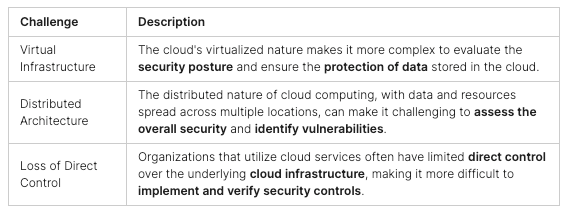
    Challenges in Cloud Security Auditing

    Evaluating cloud security has its own set of issues. The nature of being virtual spread out, and having less control over tech can be tough. This makes protecting and checking cloud systems hard.

    Dealing with these issues needs a group effort. It involves working with cloud providers and using special tools. This way, businesses keep their data safe and meet rules in cloud computing.

    The Cybersecurity Audit Process

    Conducting a thorough cybersecurity audit is key to keeping an organization safe from cyber threats. The process looks closely at how secure the organization’s digital assets are. It finds areas that need to get better.

    Step 1: Determine Audit Range and Goals

    The first step is setting the audit’s objectives and scope. This means picking the rules and goals to follow. It helps in focusing the audit on areas that need attention.

    Step 2: Collect Pertinent Data

    To understand the security setup, we need to gather lots of data. This includes info on the IT systems, network, and security policies. This step gives the auditor a full picture to find and fix weaknesses.

    Step 3: Review Existing Safeguards

    After collecting data, the auditor looks at the security controls in place. They check if these are working well. They aim to spot areas for improvement or extra protection.

    Step 4: Document Findings

    Now, the auditor shares their findings in a detailed report. The report talks about the threats, weaknesses, and recommendations. It helps the organization understand and act on these security issues.

    Step 5: Put Recommendations into Action

    The last step is acting on the audit’s results. A plan is made to fix the security problems. This plan might involve adding security measures, updating staff, or training employees. Following this plan well strengthens the organization’s security.

    Key Areas Covered in a Cybersecurity Audit

    A cybersecurity audit looks closely at an organization’s security setup. It aims to keep the company safe in every way. Here are the main points that get checked:

    Information Security Policies and Procedures

    The auditor checks the organization’s security rules and steps. They make sure these are recent, complete, and working well. It makes sure the right security policies are there to keep important data safe, guide how workers act, and deal with security events.

    Physical Security

    The auditor looks into how the company keeps its spaces safe. They see if the right steps are taken to control who gets in, to protect the borders, and to watch over areas with cameras. This makes sure that the company’s places and things are well-guarded.

    Network Security

    The auditor checks how well the organization protects its network. They look at systems like firewalls and tools that spot if someone’s trying to break in. This work aims to find and fix any security holes in the company’s network.

    Application Security

    The auditor reviews how the organization’s software is guarded. They check that good practices are used like making sure data put in the app is safe. This step helps protect important software from threats and weak spots.

    User Security

    The auditor examines how the organization makes its users safe. They look at how passwords are handled, how security is taught to employees, and how important data is only accessible by the right people. This check makes sure that people working for the company also help keep it safe.

    Cybersecurity Audits for Regulatory Compliance

    Today’s businesses face the challenge of meeting various laws to keep data safe and trust. They use cybersecurity audits to check their compliance with rules and protect their work.

    PCI DSS Compliance

    Companies dealing with credit card payments must pass cybersecurity audits to follow PCI DSS rules. These checks look at their security, data safety, and how they respond to problems. They ensure customer payment info stays safe and that rules are met.

    HIPAA Compliance

    In healthcare, these audits help meet HIPAA rules that protect patient info. They review security, who can access data and handling procedures. This keeps health details private and follows the law.

    GDPR Compliance

    Companies handling EU people’s data must do these audits to align with GDPR. They check how data is protected, if people agree to use their data, and what to do if there’s a problem. This proves the company follows strict privacy standards.

    Conducting audits often helps lower the risks of breaking the law and facing penalties. It shows a company cares about keeping data safe, which builds trust with customers and protects its image.

    Cybersecurity Audits

    Cybersecurity audits are key for organizations to hit major goals. They help in finding and lessening risks. This protects important info and makes the organization’s security better.

    Identifying and Mitigating Risk

    These audits are critical. They help find security holes and dangers. This way, businesses can focus on fixing the most important risks. It helps make their systems safer from cyber dangers.

    Protecting Sensitive Information

    Keeping security controls updated is the job of cybersecurity audits. They check that important data is safe. This means using tools like encryption, access rules, and strong data backup. These steps are vital for keeping critical info private, safe, and available.

    Improving Security Posture

    After an audit finds weaknesses, organizations work on them. This makes their security stronger. A better defense against cyber threats is the result. Plus, customers and partners trust them more.

    Conducting a Cybersecurity Audit

    A cybersecurity audit is a thorough check of an organization’s digital security. It helps find weak points, review safety measures, and suggest how to get better. This process ensures the organization’s tech setup and risks are carefully looked at. The goal is to offer tips that can help.

    Planning and Scoping the Audit

    The first task is to understand the IT setup, the goals, and the risks of the organization. This insight shapes the audit’s focus and methods. It ensures the audit meets the specific needs of the company. Through planning, the audit offers valuable insights that are on point.

    Gathering Information and Data

    Next, it’s time to gather info. This includes checking for risks, finding flaws, and testing how easy it is to break in. By looking at this data, the auditor can figure out where to focus and suggest improvements.

    Evaluating Cybersecurity Controls

    The auditor then checks the security controls in place. They look at how well the organization manages who can access their system, how they encrypt data and their response to incidents. The goal is to see if these measures are enough to stay safe.

    Reviewing Data and Identifying Vulnerabilities

    The auditor reviews all data to find weaknesses in the organization’s defenses. This step is crucial to understanding the whole security picture. It points out what needs fixing right away.

    Documenting Findings and Recommendations

    The last part involves creating a detailed report. It lists what was found, what needs to change, and how to improve. This document gives a clear guide for making the organization’s digital space safer and stronger.

    Benefits of Regular Cybersecurity Audits

    Doing regular checks on cybersecurity helps many aspects of a business. It makes the business safer, keeps it in line with the law, builds trust with customers, and ensures the business keeps running smoothly. Now, let’s look into these benefits more closely:

    Enhanced Security

    Cybersecurity audits find and fix weak spots in a company’s tech and networks. By looking for these issues early, a company can add extra layers of protection. This helps lower the chance of getting hit by hackers or losing important data. So, checking risks and fixing them is key for a strong, safe tech setup.

    Compliance Assurance

    Many areas of business are now closely watched to make sure they are following the rules. This includes things like protecting people’s private info (HIPAA, GDPR) or handling credit card data safely (PCI DSS). Regular checks ensure a company is following these rules. Avoiding fines and other problems linked to rule-breaking is a big plus.

    Customer Confidence

    Showing that cybersecurity is a top priority through scheduled checks can do wonders for trust. In today’s world, where a data breach can shake things up, having your customers’ trust is gold. It keeps a company’s reputation and business strong, even if something bad happens.

    Business Continuity

    Strong cybersecurity and the ability to quickly react to threats, highlighted by these audits, are vital. They help a business keep running, even in tough times. This is how a company weathers through cyberattacks and stays in business in the long run.

    In wrapping up, cybersecurity checks bring big benefits. They make a business more secure, help it stay on the right side of the law, boost customer trust, and ensure the business keeps going. Being proactive about security is crucial for businesses to protect what they’ve built, facing future digital challenges with confidence.

    Choosing the Right Cybersecurity Audit Provider

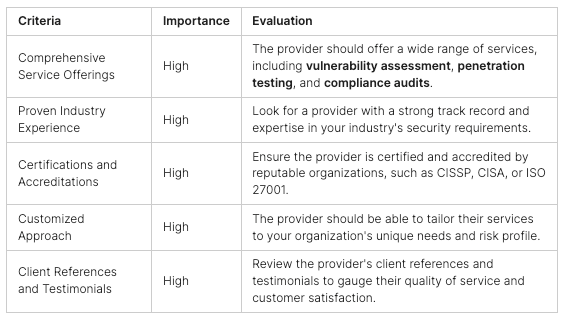
    It’s key to pick a cybersecurity audit provider with the right skills and background. They should be good at cybersecurity audits, network security assessments, and vulnerability scanning. Make sure they offer lots of services like penetration testing, risk management, and compliance audits. This ensures they can meet all your data protection and ethical hacking needs.

    The best provider should know a lot about the security needs of your industry and how to respond to incidents. Check their success stories, recommendations from other clients, and certificates. This will confirm they have what it takes to give you great cybersecurity audits.

    By looking at these points, you can ensure your organization works with experts. They should be able to do great security assessments that keep your important data safe and meet rules.

    Conclusion

    In today’s digital age, cybersecurity audits are essential for safeguarding organizations against the increasing threats in the online world. These audits provide a thorough examination of security measures, ensuring that risks are mitigated, regulatory requirements are met, and overall safety is enhanced.

    As businesses increasingly rely on technology and the internet, robust cybersecurity practices become even more critical. Cybersecurity audits are a wise investment, identifying and addressing vulnerabilities, protecting sensitive data, and instilling confidence in customers.

    In summary, cybersecurity audits play a pivotal role in combating online threats. By adhering to their recommendations, organizations can stay ahead of cyber threats, protect their digital assets, and maintain customer trust and safety.

    For comprehensive cybersecurity solutions, including audits, penetration testing, and more, visit Peris.ai Cybersecurity. Explore our wide range of products and services designed to keep your business secure in an ever-evolving digital landscape. Secure your business today with Peris.ai.

    FAQ

    What is a cybersecurity audit?

    A cybersecurity audit deeply looks into an organization’s info systems. It checks policies, procedures, and technology used. The aim is to make sure these systems are effectively keeping data safe.

    What are the objectives of a cybersecurity audit?

    The goal of a cybersecurity audit is to find and fix weak spots. It wants to make sure an organization’s data is secure from every possible threat. This includes suggesting ways to upgrade and protect data better.

    What are the key benefits of cybersecurity audits?

    These audits are helpful in many ways. They find and fix security gaps. They help companies follow laws and rules. Audits make security policies and responses to problems better. They also improve how well data is kept safe and private.

    Why is cloud security auditing crucial?

    Cloud security audits are key for keeping cloud-stored data safe. They check how secure the cloud’s systems are. This includes looking at how data is stored, who can access it, and how threats are handled.

    What are the challenges in cloud security auditing?

    The main challenge in auditing cloud security is the unique nature of cloud services. Their virtual setup and wide-reaching structure make control hard. This can make it tough to check and ensure full security.

    What are the key steps in the cybersecurity audit process?

    The main steps in a cybersecurity audit start with planning. They go on to collect important info and then review what’s already in place. Finally, after noting down any issues, the audit makes recommendations to fix problems.

    What key areas does a comprehensive cybersecurity audit typically cover?

    A broad cybersecurity audit usually looks into several important aspects. This includes policy and procedure checks, site and data security, protecting digital networks, securing software, and making sure users are safe.

    How do cybersecurity audits help with regulatory compliance?

    Cybersecurity audits are important for meeting legal rules and data standards. They ensure that an organization’s security measures satisfy required laws, like PCI DSS, HIPAA, and GDPR.

    What are the key objectives of conducting cybersecurity audits?

    The main goals of cybersecurity audits are to lower risks, protect important data, and make security measures stronger. They aim to keep businesses and their customers safe from cyber threats and data risks.

    What are the steps in conducting a comprehensive cybersecurity audit?

    To carry out a deep cybersecurity audit, planning comes first. It’s followed by information collection and a full check of security setups. After identifying any weak points, the audit reports its findings and provides solutions.

    What are the key benefits of regular cybersecurity audits?

    Having cybersecurity audits often brings several advantages. It tightens security, ensures rule compliance, boosts customer trust, and keeps business operations running smoothly. This is why regular check-ups are important.

  • Affordable Cybersecurity Strategies for SMBs: Boost Your Defenses Without Breaking the Bank

    Affordable Cybersecurity Strategies for SMBs: Boost Your Defenses Without Breaking the Bank

    In today’s digital age, small and medium-sized businesses (SMBs) often find themselves particularly vulnerable to cyberattacks. While resource limitations can pose challenges, effective cybersecurity is still within reach. Here are practical, cost-effective measures SMBs can implement to enhance their cybersecurity posture without substantial investments.

    ️ Employee Cybersecurity Training

    Empower Your Team: Employees can act as your first line of defense against cyber threats. Regular training sessions can enhance their ability to recognize and respond to security threats like phishing and social engineering.

    • Actions: Conduct routine training workshops, disseminate updates on the latest threats, and establish a clear protocol for reporting suspicious activities.

    Strong Password Policies

    Secure Access Control: Enforcing robust password policies is crucial for safeguarding your business from unauthorized access.

    • Strategies: Mandate complex passwords that include a mix of characters, implement multi-factor authentication (MFA), promote the use of password managers, and require regular password changes for sensitive accounts.

    Regular System Updates

    Patch and Protect: Keeping software and operating systems up to date is one of the simplest yet most effective defenses against cyber threats.

    • Implementation: Activate automatic updates for software and hardware, conduct periodic checks for updates, and phase out unsupported systems that might be vulnerable to attacks.

    Data Backup and Recovery

    Prepare for the Worst: Regular backups can mitigate the impact of data loss due to cyber incidents like ransomware.

    • Backup Protocol: Automate data backups, ensure backups are stored in multiple, secure locations (including cloud storage), regularly test backup integrity, and encrypt backups to secure sensitive data from unauthorized access.

    ️ Cost-Effective Cybersecurity Tools

    Leverage Affordable Solutions: Protecting your network need not be prohibitively expensive. Various budget-friendly tools can significantly fortify your defenses.

    • Tools to Consider: Utilize reliable antivirus software, deploy firewalls to monitor and control incoming and outgoing network traffic, set up email filtering to curb phishing threats, and use a virtual private network (VPN) for secure remote access.

    Conclusion: Maximizing Cyber Resilience on a Budget

    For SMBs, robust cybersecurity doesn’t require extravagant spending. By prioritizing key protective measures—employee education, strong password policies, regular updates, secure backups, and strategic tool deployment—you can effectively shield your business from a range of cyber threats.

    For ongoing tips and personalized guidance on safeguarding your operations, visit Peris.ai. Protect your enterprise with tailored solutions that ensure you stay secure in the evolving threat landscape.

    Your Peris.ai Cybersecurity Team #YouBuild #WeGuard

  • Bug Bounty or VDP: Which to Choose?

    Bug Bounty or VDP: Which to Choose?

    The digital landscape is a vibrant tapestry of innovation, interconnection, and interdependence. Within this intricate weave, cybersecurity is an ever-watchful guardian, safeguarding the integrity and confidentiality of digital realms. While propelling technological progress, the expanding network of systems, devices, and applications has opened Pandora’s box of potential security vulnerabilities and breaches. Navigating this intricate terrain demands a proactive stance, compelling organizations to seek and implement methods that efficiently unearth and mitigate vulnerabilities before malicious entities can leverage them. Two distinct yet interrelated strategies have gained prominence in this pursuit: Bug Bounty programs and Vulnerability Disclosure Programs (VDPs). Our expedition through this article will be a comprehensive exploration of the inner workings of these strategies, unraveling their unique characteristics, advantages, and pertinent considerations. By undertaking this comparative voyage, we aim to equip you with the knowledge necessary to make a judicious and well-informed choice between Bug Bounty programs and VDPs, per your specific needs and aspirations.

    Bug Bounty Programs: Harnessing the Power of Crowdsourcing

    Bug Bounty programs have gained significant popularity for organizations to leverage the collective expertise of ethical hackers, also known as white hat hackers, in identifying and reporting security vulnerabilities. These programs essentially provide a financial incentive for ethical hackers to discover and report vulnerabilities to the organization. The fundamental idea behind Bug Bounty programs is to create a competitive environment that encourages skilled hackers to search for vulnerabilities and report them responsibly and actively.

    One of the primary advantages of Bug Bounty programs is their ability to tap into a global talent pool. Ethical hackers from various backgrounds and expertise levels can participate, leading to a diverse range of perspectives that can uncover vulnerabilities that might otherwise go unnoticed. This approach can result in a more comprehensive security assessment of an organization’s digital assets.

    Bug Bounty programs also provide a structured framework for vulnerability reporting and management. Organizations define the scope of the program, including the assets in scope, the types of vulnerabilities sought, and the reward structure. This clarity helps both the organization and the hackers involved, ensuring that efforts are focused on areas of critical concern.

    Moreover, the financial rewards offered by Bug Bounty programs can be attractive to skilled hackers. Depending on the severity of the reported vulnerability, rewards can range from a few hundred to several thousand dollars or even more in some cases. This can motivate hackers to dedicate their time and skills to uncovering vulnerabilities malicious actors might otherwise exploit.

    However, Bug Bounty programs also come with some considerations. The financial commitment can be substantial, especially for organizations with limited resources. Additionally, managing a Bug Bounty program requires a robust infrastructure to handle vulnerability reports, verify their authenticity, and coordinate with the ethical hackers involved. Organizations must also be prepared to respond promptly to reported vulnerabilities and communicate effectively with the researchers.

    Vulnerability Disclosure Programs (VDPs): Collaboration and Transparency

    Vulnerability Disclosure Programs (VDPs) take a different approach to cybersecurity. Unlike Bug Bounty programs, VDPs focus on establishing a transparent and collaborative relationship between organizations and the security research community. In a VDP, organizations invite researchers to disclose vulnerabilities without the promise of monetary rewards responsibly. Instead, the emphasis is on improving security and protecting user data.

    The main advantage of VDPs lies in their commitment to open communication and cooperation. Organizations foster an environment of goodwill and shared responsibility by inviting security researchers to report vulnerabilities without a financial incentive. This can lead to a more ethical and principled approach to vulnerability disclosure, as researchers are driven by a genuine desire to contribute to the greater good.

    VDPs also help organizations build a positive reputation within the security community. A transparent and responsive approach to vulnerability disclosure can enhance an organization’s credibility and trustworthiness. Researchers are more likely to engage with organizations that are committed to promptly and responsibly addressing security issues.

    Furthermore, VDPs can be a cost-effective alternative to Bug Bounty programs. While organizations may not offer monetary rewards, the resources required to manage a VDP are generally lower. This makes VDPs an attractive option for organizations with limited budgets or those seeking to establish a security culture without the financial burdens associated with Bug Bounty programs.

    However, VDPs also have their considerations. Without the allure of monetary rewards, organizations may receive fewer reports, and researchers might prioritize programs that offer financial incentives. Additionally, the lack of financial motivation could lead to less engagement and effort from researchers, potentially affecting the quality and depth of vulnerability discoveries.

    Choosing the Right Approach: Factors to Consider

    When deciding between a Bug Bounty program and a Vulnerability Disclosure Program, organizations should carefully consider several key factors:

    1. Budget and Resources: Bug Bounty programs require financial rewards and infrastructure commitments, while VDPs are generally more cost-effective. Evaluate your organization’s financial capacity and available resources.
    2. Scope and Assets: Define the scope of the program and the assets you want to protect. Bug Bounty programs are more suited for targeted assessments, while VDPs encourage broad engagement.
    3. Expertise and Diversity: Bug Bounty programs attract a wide range of expertise, potentially leading to diverse vulnerability discoveries. VDPs, on the other hand, emphasize collaboration and transparency.
    4. Engagement Level: Consider the level of engagement you expect from security researchers. Bug Bounty programs may attract more dedicated efforts due to financial incentives.
    5. Reputation and Trust: VDPs can help build a positive reputation among the security community and users. Bug Bounty programs showcase a commitment to security and reward responsible disclosure.
    6. Time Sensitivity: Bug Bounty programs can provide rapid results due to the competitive nature of the approach. VDPs might require more time for researchers to contribute voluntarily.
    7. Long-Term Strategy: Consider whether you want a one-time assessment (Bug Bounty) or an ongoing, collaborative relationship (VDP) with the security community.

    Conclusion

    In the dynamic cybersecurity arena, the strategic deployment of Bug Bounty programs and Vulnerability Disclosure Programs (VDPs) assumes pivotal significance in the relentless pursuit of identifying and remedying vulnerabilities. The dual facets of this digital coin hold unique roles in the intricate choreography of safeguarding digital landscapes. Like a symphony of collective expertise, Bug Bounty programs orchestrate the harmonious collaboration of ethical hackers fueled by financial incentives. This dynamic orchestration propels laser-focused and competitive vulnerability discovery, an approach underscored by its undeniable efficacy.

    Conversely, the narrative shifts with Vulnerability Disclosure Programs (VDPs), a paradigm rooted in openness, cooperation, and transparency. Within VDPs, the orchestra gives way to an ensemble of principled researchers driven not by monetary rewards but by an unwavering commitment to elevating digital security. This ensemble cultivates an environment where shared responsibility flourishes, enabling organizations to cultivate an untarnished reputation and foster trust within the security community.

    In the labyrinthine decision-making process, organizations stand at the crossroads of Bug Bounty programs and VDPs, each path illuminated by its own set of luminous beacons. The choice, a reflection of an organization’s aspirations, financial standing, resource allocation, and engagement expectations, can chart the trajectory of its cybersecurity journey. The discerning few might embark on a voyage that seamlessly fuses the merits of both methodologies, forging a hybrid approach that capitalizes on the strengths of Bug Bounty programs and VDPs alike.

    As the digital symphony of vulnerabilities and countermeasures continues to evolve, one principle remains immutable: the pursuit of safeguarding digital assets and user data. Here, Peris.ai’s groundbreaking solution, the “Korava Bug Bounty Platform,” emerges as a beacon of promise. Born from the crucible of frustration and forged by the crucible of necessity, Peris.ai Korava is a testament to the commitment to resolving critical vulnerabilities in their infancy, long before they unfurl their malicious intent to the public eye. This platform embodies a balanced equation, offering incentives that resonate equally with organizations and independent IT researchers. A harmony of interests, it weaves a narrative of collaborative security, transcending the confines of traditional paradigms. As you stand on the precipice of your cybersecurity journey, we invite you to explore the realms of Peris.ai Korava, a solution designed to mitigate threats and orchestrate a harmonious synergy between security, assurance, and recognition. Visit our website and embark on a voyage toward a more resilient and secure digital future.

  • Cybersecurity Reporting: Transparency Leads to Trust

    Cybersecurity Reporting: Transparency Leads to Trust

    Embracing a culture of cybersecurity transparency is crucial in today’s digital landscape. Transparency not only differentiates businesses but also strengthens trust with customers, the C-Suite, the media, and other stakeholders. By openly sharing information about cybersecurity practices, organizations can foster trust and demonstrate their commitment to protecting sensitive data.

    In addition to building trust, transparency in cybersecurity reporting promotes clear procedures for incident response and enhances the collective security of industries. When organizations proactively disclose cybersecurity challenges, it allows them to learn from each other’s experiences, preventing future attacks and improving overall resilience.

    Key Takeaways:

    • Cybersecurity transparency builds trust with stakeholders and differentiates businesses.
    • Transparency promotes clear incident response procedures and industry-wide security improvement.
    • Transparency is crucial for fostering trust and demonstrating commitment to protecting sensitive data.

    The Benefits of Cybersecurity Transparency

    Transparency and accountability are critical in the field of cybersecurity. Organizations that prioritize transparency not only build trust with their stakeholders but also gain a competitive edge in the industry. By providing clear visibility into their vulnerability management, disclosures, and reporting procedures, businesses can demonstrate their commitment to robust security practices.

    Embracing transparency allows organizations to not only react quickly to breaches but also enhance their resilience. By promptly disclosing security incidents and vulnerabilities, companies can address them more effectively and prevent further damage. This proactive approach decreases the impact of cyberattacks, safeguarding the organization and its stakeholders.

    Furthermore, transparency promotes communication and collaboration between organizations. When businesses openly share their cybersecurity challenges and best practices, it creates an environment of collective learning and improvement. By engaging in collaborative efforts, companies can strengthen the overall security posture of the industry, making it more difficult for cybercriminals to exploit vulnerabilities.

    “Transparency is the foundation of trust and creates a positive perception of an organization’s commitment to cybersecurity.”

    Building trust through transparency is not only crucial for maintaining positive relationships with customers and partners, but it also attracts new opportunities. Customers are more likely to engage with companies that are transparent about their security practices and prioritize the protection of their data. Increased trust leads to increased customer loyalty and market reputation, giving organizations a significant competitive advantage.

    As the threat landscape continues to evolve, organizations cannot afford to ignore the importance of cybersecurity transparency. By embracing transparency, businesses can demonstrate their commitment to protecting their stakeholders’ interests, foster collaboration across the industry, and build a strong foundation of trust.

    The Role of Cybersecurity Reporting

    Cybersecurity reporting plays a pivotal role in fostering transparency within organizations. It enables businesses to document and share relevant information about their security practices, incident responses, and vulnerability management. Through detailed cybersecurity reports, organizations can provide stakeholders with a comprehensive understanding of their security posture and demonstrate their commitment to risk management.

    The Challenges of Cybersecurity Reporting

    Despite the growing importance of cybersecurity reporting, many organizations continue to grapple with significant challenges in this area. One obstacle that persists is the culture of security through obscurity, where businesses keep their cybersecurity activities secretive. This approach stems from the fear of reputational and monetary damage that could result from disclosing cybersecurity incidents.

    However, organizations must recognize that maintaining secrecy can actually harm their reputation in the long run. By concealing cybersecurity incidents, businesses risk losing the trust of their customers, partners, and stakeholders. When breaches or vulnerabilities are eventually exposed, the reputational damage can be significant and difficult to mitigate.

    “Transparency is crucial in cybersecurity reporting. Concealing incidents may lead to even greater reputational damage when exposed.”

    To illustrate the importance of addressing this challenge, consider the following table:

    This table highlights the challenges organizations face in cybersecurity reporting, their potential impact, and suggested solutions to overcome them.

    By addressing the challenges and embracing cybersecurity reporting transparency, businesses can foster a culture of trust, strengthen their security practices, and proactively protect themselves against potential threats.

    Trust Starts with Transparency

    The regulatory landscape and industry trends point towards a fundamental shift in the approach to cybersecurity, with an increasing emphasis on transparency. Organizations that embrace this culture of openness not only enhance their own security posture but also contribute to the overall security of the digital world.

    Transparency in security fosters trust through the sharing of knowledge, reporting of attacks, disclosing vulnerabilities, and even leveraging ethical hacking. By adopting these practices, organizations establish themselves as trustworthy security partners, encouraging collaboration and communication within the cybersecurity ecosystem.

    The Power of Sharing Knowledge

    Transparency begins with sharing knowledge. Organizations should proactively communicate their cybersecurity practices, protocols, and incident response procedures. This open dialogue ensures that stakeholders have a clear understanding of the steps taken to protect sensitive data and systems.

    By openly discussing their security measures, organizations can build confidence and strengthen customer trust. Transparency eliminates the mystery surrounding security practices and fosters a sense of shared responsibility.

    Reporting Attacks and Disclosing Vulnerabilities

    In the event of a cyber attack, organizations should prioritize timely and transparent reporting. This open communication not only allows affected parties to take necessary precautions but also demonstrates a commitment to addressing security challenges promptly.

    Similarly, disclosing vulnerabilities is crucial in maintaining transparency. By sharing information about known vulnerabilities and actively seeking ways to address them, organizations contribute to the collective security of the digital ecosystem.

    Putting Developers at the Heart of Security

    Another essential aspect of transparency is embedding security into the development process. By prioritizing security during the software development lifecycle, organizations can uncover vulnerabilities early on and mitigate potential risks.

    Empowering developers with the necessary tools, training, and resources helps create a security-first mindset, leading to more secure applications and systems. Transparent collaboration between developers and security teams ensures that security concerns are addressed efficiently and effectively.

    The Role of the Entire Cybersecurity Ecosystem

    Transparency extends beyond individual organizations to encompass the entire cybersecurity ecosystem. Collaboration among different stakeholders, including vendors, researchers, policymakers, and end-users, is key to combating evolving threats.

    By actively participating in industry collaborations, organizations can contribute to the development and dissemination of best practices, threat intelligence sharing, and the establishment of common security standards. This collaborative approach enhances the overall security posture and strengthens trust across the digital landscape.

    Embracing transparency in security is not without its challenges, but the benefits far outweigh the risks. By prioritizing openness, organizations can foster a culture of trust, promote effective security practices, and contribute to the collective security of our interconnected word.

    Disclosing Complete and Accurate Cybersecurity Information

    Transparency in cybersecurity reporting is crucial for organizations to maintain trust and demonstrate their commitment to security. When disclosing information about their security posture, organizations must ensure that the information provided is complete and accurate. This ensures that stakeholders have a clear understanding of the organization’s cybersecurity practices and the associated risks.

    Cybersecurity documentation plays a vital role in providing a comprehensive overview of an organization’s security measures and risk management strategies. By documenting security processes, procedures, and controls, organizations can establish a solid foundation for transparency and accountability.

    In many cases, CISOs (Chief Information Security Officers) face immense pressure to present a mature cybersecurity risk management process, even when controls may be insufficient. To meet these demands, it is essential for organizations to have rigorous risk management frameworks in place. This includes periodic risk assessments, vulnerability management programs, incident response plans, and ongoing monitoring and testing of security controls.

    Board oversight is a critical component of cybersecurity reporting and transparency. Boards of directors should be actively involved in understanding the organization’s cybersecurity risks and asking granular questions to ensure accurate disclosures. By having a full appreciation of the cybersecurity landscape, boards can provide valuable guidance and support in mitigating security risks.

    One effective way to enhance transparency is by maintaining a dynamic repository of cybersecurity questionnaire responses. This allows organizations to quickly and efficiently respond to requests for information from stakeholders, such as regulators, investors, or customers. By having readily available and up-to-date information, organizations can demonstrate their commitment to transparency and proactive risk management.

    Furthermore, organizations can consider engaging third-party professionals for independent assessments of their cybersecurity practices. These assessments provide an objective evaluation of an organization’s security posture and can help identify areas for improvement. Sharing the results of these assessments can further enhance transparency and build trust among stakeholders.

    “Transparency in cybersecurity reporting is not just about sharing positive outcomes, but also acknowledging weaknesses and vulnerabilities. By openly discussing challenges and demonstrating a commitment to improvement, organizations can foster a culture of continuous learning and improvement.”

    The Benefits of Disclosing Complete and Accurate Cybersecurity Information

    • Enhanced trust and credibility with stakeholders
    • Improved reputation and brand perception
    • Clear understanding of cybersecurity risks and mitigation strategies
    • Opportunities for collaboration and knowledge sharing
    • Proactive identification and remediation of security vulnerabilities

    The Role of a Trust Center in AI Cybersecurity Transparency

    As AI-enabled technologies continue to advance, concerns about cybersecurity become increasingly significant. Building and maintaining customer trust requires transparency in AI cybersecurity. To facilitate this transparency, organizations can leverage the power of a Trust Center.

    A Trust Center serves as a central hub for organizing and displaying security documentation related to AI cybersecurity. It acts as a repository of valuable information, providing clear visibility into the security measures implemented in AI systems.

    One of the primary functions of a Trust Center is to control access to sensitive information. By managing access permissions, organizations ensure that only authorized individuals can view and retrieve sensitive cybersecurity documentation.

    “A Trust Center simplifies transparency in AI cybersecurity by organizing and displaying security documentation, controlling access to sensitive information, and automating responses to security questionnaires.”

    Furthermore, a Trust Center plays a crucial role in automating responses to security questionnaires. This automation streamlines the process of sharing security information with stakeholders, such as customers, partners, and regulatory bodies. By automating the response process, organizations can ensure consistency and accuracy in their information sharing, saving time and resources in the process.

    In addition to its organizational and automation capabilities, a Trust Center enables companies to keep their cybersecurity documentation updated in real time. This ensures that stakeholders have access to the most current and accurate information regarding AI security practices.

    By providing a single location for buyers and customers to access AI security information, a Trust Center promotes trust and transparency. It instills confidence in the security measures implemented within AI systems and demonstrates a commitment to maintaining high cybersecurity standards.

    The Benefits of a Trust Center

    The implementation of a Trust Center in AI cybersecurity offers several benefits:

    • Enhanced transparency: A centralized platform ensures that security documentation is easily accessible, promoting transparency and open communication about AI cybersecurity practices.
    • Streamlined information sharing: Automating responses to security questionnaires reduces manual effort, allowing organizations to efficiently provide accurate and consistent information to stakeholders.
    • Real-time updates: The Trust Center keeps cybersecurity documentation up to date, ensuring that stakeholders have access to the most current information.
    • Building trust: A Trust Center demonstrates a commitment to cybersecurity transparency, helping to build and maintain trust with customers, partners, and regulatory bodies.

    Overall, a Trust Center serves as a critical component in achieving transparency in AI cybersecurity. By organizing and displaying security documentation, controlling access to sensitive information, and automating responses to security questionnaires, companies can foster trust and confidence in their AI systems.

    How a Trust Center Works

    A Trust Center is a critical component in enabling transparency and enhancing the buyer security review process for AI-enabled technologies. It serves as a centralized platform where organizations can provide comprehensive security documentation to buyers, including essential AI cybersecurity information such as AI fact sheets and FAQs.

    By offering a buyer-facing home for security documentation, a Trust Center helps reduce friction in the buyer security review process. Buyers can access the necessary information at their convenience, enabling a self-service approach that saves time and effort for both parties involved.

    One of the key features of a Trust Center is the control over access to sensitive information. Organizations can ensure that specific information is accessed only by those who need to know, providing an additional layer of security and confidentiality.

    Additionally, a Trust Center includes a Knowledge Base of AI-related questionnaire responses. This streamlines the information exchange with buyers and customers, as it provides a repository of pre-approved responses to commonly asked AI security questions. This saves time for both parties and ensures consistent and accurate information is communicated.

    Example: AI Fact Sheet

    Table: Example AI Fact Sheet showcasing key information about AI security practices.

    Overall, a Trust Center provides organizations with a robust platform to showcase their commitment to AI security transparency. It enhances the buyer security review process, streamlines information exchange, and ensures the dissemination of accurate and up-to-date AI security information.

    Ensuring Up-to-date AI Security Information

    As AI technology continues to advance and cybersecurity risks evolve, it is crucial for organizations to provide buyers and customers with the most accurate and up-to-date AI security information. Keeping AI-related documentation current and accessible is essential in maintaining transparency and ensuring the highest level of security.

    A Trust Center plays a vital role in this process, allowing companies to keep their AI-related documentation updated in real time. By leveraging the capabilities of the Trust Center, organizations can ensure that buyers and customers only access the most recent information, reducing any potential confusion or misinformation.

    Furthermore, the Trust Center’s notification and email capabilities enable proactive communication with buyers and customers regarding AI policies and procedure changes. This ensures that all stakeholders are aware of any updates or shifts in cybersecurity practices, enhancing transparency and establishing trust.

    With real-time updates of AI-related documentation through the Trust Center, organizations can address the ever-changing landscape of cybersecurity shifts. This helps companies stay ahead of potential threats and vulnerabilities, providing buyers and customers with the confidence that their AI technology is being protected by the latest security measures.

    The image above represents the intersection between AI technology and cybersecurity, showcasing the importance of keeping AI security information up to date in today’s digital landscape.

    Automating Responses to Security Questionnaires

    A Trust Center can be a game-changer when it comes to automating responses to security questionnaires. By leveraging the information and documentation stored in the Trust Center, organizations can streamline the process of completing security questionnaires, saving time and resources while ensuring consistent and accurate responses.

    With the ability to automate responses, organizations no longer need to manually fill out each security questionnaire they receive. Instead, they can rely on the Trust Center to provide pre-populated answers based on the stored information. This not only improves efficiency but also reduces the risk of human error that may occur when completing questionnaires manually.

    Furthermore, by having a centralized repository of AI-related questionnaire responses, organizations can enhance their communication with customers and investors. They can quickly provide accurate and comprehensive information about AI cybersecurity risks, demonstrating their commitment to cybersecurity and building trust with stakeholders.

    The automation of security questionnaire responses through a Trust Center offers several benefits:

    • Improved efficiency: Automating the process saves time and resources, allowing organizations to focus on other critical cybersecurity tasks.
    • Consistent and accurate responses: The Trust Center ensures that responses to questionnaires are consistent and based on up-to-date information, reducing the risk of discrepancies or outdated information.
    • Enhanced communication: Organizations can effectively communicate their cybersecurity measures and AI-related risks to customers and investors, fostering transparency and trust.

    In summary, automating responses to security questionnaires through a Trust Center simplifies the buyer security review process, streamlines information exchange, and enables organizations to provide accurate and complete information about AI cybersecurity risks. By leveraging this automation, organizations can prioritize their cybersecurity efforts while building trust and confidence among their stakeholders.

    Benefits of Automating Responses to Security Questionnaires

    • Improved efficiency
    • Consistent and accurate responses
    • Enhanced communication

    Conclusion

    In today’s digital ecosystem, the significance of transparency in cybersecurity cannot be overstated. It not only cultivates trust but also elevates the integrity of security practices within organizations. The implementation of a Trust Center is instrumental in championing this transparency, serving as a robust platform for organizing and disseminating crucial security information, managing access to sensitive data, and streamlining the response mechanism for security inquiries. Utilizing a Trust Center ensures that organizations can keep their AI security data promptly updated, thereby enriching the customer experience and positioning security as a catalyst for revenue growth while solidifying customer confidence.

    The essence of transparency in cybersecurity reporting is foundational for forging trust with both stakeholders and customers. Establishing a culture rooted in openness and proactive sharing empowers organizations to stand out and fortify their connections with essential partners and clientele. A Trust Center, acting as a unified repository for security documentation, facilitates effortless access to and management of sensitive information. The automation of responses to security questionnaires not only conserves time but also guarantees the delivery of consistent and precise information. In essence, the adoption of transparency practices and the integration of a Trust Center yield mutual benefits for both the organization and its clientele.

    As cybersecurity threats continue to evolve with increasing sophistication, the urgency for organizations to maintain contemporary AI security information becomes paramount. A Trust Center equips companies with the agility to update their AI-centric documentation dynamically, enabling real-time adaptability. Proactive dissemination of updates regarding policies and procedures to customers and buyers fosters a transparent culture and underscores an organization’s dedication to stringent cybersecurity measures. By embracing a Trust Center and placing a premium on transparency, organizations can not only refine their security protocols but also cultivate enduring trust among stakeholders.

    Peris.ai Cybersecurity recognizes the transformative impact of transparency in strengthening cybersecurity measures and building trust. Our solutions, designed with this ethos at their core, provide organizations with the tools necessary to establish a comprehensive Trust Center, ensuring the management, accessibility, and update of critical security information. We invite you to explore how Peris.ai Cybersecurity can enhance your organization’s cybersecurity transparency and practices. Visit us at Peris.ai Cybersecurity to discover how our innovative approaches can fortify your cybersecurity framework, promoting trust and security as pivotal elements of your business strategy.

    FAQ

    What are the benefits of cybersecurity transparency?

    Cybersecurity transparency allows organizations to differentiate themselves, strengthen trust with stakeholders, and enhance their overall security. It leads to clear incident response procedures and promotes collaboration within industries.

    What challenges do organizations face in cybersecurity reporting?

    Many organizations struggle to proactively disclose cybersecurity challenges due to fear of reputational damage. The culture of security through obscurity often hinders transparent reporting.

    How does trust start with transparency in cybersecurity?

    Transparency in cybersecurity builds trust by providing clear visibility into vulnerability management, reporting procedures, and overall security posture. Effective communication and collaboration foster trust and reduce the reoccurrence of cyberattacks.

    How can organizations disclose complete and accurate cybersecurity information?

    CISOs face pressure to present a mature cybersecurity risk management process, even when controls are insufficient. Boards should ask granular questions and have a full appreciation of cybersecurity risks to ensure accurate disclosures. Maintaining a dynamic repository of cybersecurity questionnaire responses and engaging third-party professionals can enhance transparency.

    What is the role of a Trust Center in AI cybersecurity transparency?

    A Trust Center serves as a central location for organizing and displaying security documentation related to AI cybersecurity. It ensures controlled access to sensitive information and automates responses to security questionnaires, simplifying the transparency process.

    How does a Trust Center work?

    A Trust Center provides a home for security documentation, such as fact sheets and FAQs, allowing self-service access to buyers and customers. It controls access to sensitive information and includes a Knowledge Base of AI-related questionnaire responses. The Trust Center also enables real-time updates and proactive communication with buyers and customers regarding AI policies and procedure changes.

    How does a Trust Center ensure up-to-date AI security information?

    A Trust Center allows organizations to keep their AI-related documentation updated in real time, ensuring that buyers and customers always access the most recent information. It also facilitates effective communication and transparency during shifts in cybersecurity risks.

    How can a Trust Center automate responses to security questionnaires?

    By leveraging the information and documentation stored in a Trust Center, organizations can automate responses to security questionnaires. This automation reduces time spent on completing questionnaires and ensures consistent and accurate responses. The centralized repository of AI-related questionnaire responses enables effective communication with customers and investors, providing comprehensive information about AI cybersecurity risks.

  • Emergency Call: The Top 6 Incident Management Software Tools

    Emergency Call: The Top 6 Incident Management Software Tools

    In today’s fast-paced digital world, the ability to respond swiftly and effectively to IT incidents is more crucial than ever. Robust incident management software plays a pivotal role in helping organizations handle crises with finesse rather than frenzy. This guide delves into the top six incident management software choices for 2024, tailored for DevOps and SRE teams across various business stages, from nimble startups to mature enterprises.

    Top Incident Management Solutions

    Explore the standout features, pros, and cons of each leading platform to find the best fit for your organizational needs.

    1. Splunk On-Call (Victorops)

    • Overview: Offers streamlined on-call management and escalation processes, with a focus on automation and data-driven insights.
    • Pros: Strong automation capabilities and competitive pricing, with a data-focused approach to incident management.
    • Cons: Integration primarily focused around the Splunk ecosystem, which may not suit all users.

    2. Moogsoft

    • Overview: Utilizes AI to proactively identify and resolve IT issues before they escalate, with a focus on automation and root cause analysis.
    • Pros: Advanced AI capabilities for predictive insights and automated response actions.
    • Cons: Some users desire more customization options and have noted occasional stability issues.

    3. Squadcast

    • Overview: Integrates on-call scheduling, incident response, and reliability workflows into a unified platform, aiming to enhance system uptime and simplify operations.
    • Pros: Offers a comprehensive feature set including AI-driven noise reduction, automated incident response workflows, and real-time performance tracking.
    • Cons: Continuous updates require teams to stay updated on new features and functionalities.

    4. Pagerduty

    • Overview: Combines intelligent alert routing, AIOps for noise reduction, and detailed incident response workflows, designed for high-stakes environments.
    • Pros: Efficient alert management, wide integration options, and advanced analytical capabilities.
    • Cons: High cost can be a barrier for smaller teams or organizations with limited budgets.

    5. xMatters

    • Overview: A cost-effective solution providing core incident management functionalities with a focus on alerts, escalations, and communications.
    • Pros: Affordably priced with essential features that support effective incident management.
    • Cons: Lacks some of the more advanced features found in pricier competitor.

    6. Opsgenie

    • Overview: Known for its comprehensive alerting and on-call management capabilities, Opsgenie offers a centralized approach to incident management.
    • Pros: Efficient central management of alerts and communications, coupled with robust scheduling tools.
    • Cons: Some users have reported stability issues and infrequent updates since its acquisition by Atlassian.

    Key Considerations for Incident Management Software

    When choosing the appropriate incident management software, it’s essential to assess these vital features that bolster response effectiveness:

    • On-Call Scheduling & Management:
      • Ensures efficient scheduling of the right personnel.
      • Reduces downtime and streamlines response efforts.
    • Alerting and Notifications:
      • Provides timely, severity-based alerts via various communication channels.
      • Ensures that alerts capture the immediate attention of necessary team members.
    • Incident Response Workflows:
      • Utilizes structured workflows to guide teams through predefined steps.
      • Reduces confusion and speeds up the recovery process.
    • Integrations:
      • Achieves seamless integration with existing tools and systems.
      • Enhances operational visibility and aids in faster incident resolution.
    • Pricing Flexibility:
      • Offers cost-effective solutions that align with organizational budgets and needs.
      • Helps maintain high security levels without imposing financial burdens.

    Conclusion: Peris.ai Brahma as Your Go-To Incident Management Solution

    Discover Brahma by Peris.ai Cybersecurity, a powerful alternative to conventional incident management systems. Designed to optimize operational resilience, Brahma combines the best of AI technology with user-centric features:

    • AI-Powered Incident Management: Brahma utilizes advanced AI algorithms to anticipate, identify, and resolve IT issues before they escalate, significantly reducing potential disruptions.
    • Integrated On-Call Scheduling and Response: It ensures that the right personnel are alerted and ready to act swiftly and effectively, thereby minimizing downtime and enhancing operational continuity.
    • Customizable Workflows: Unlike some platforms that offer rigid solutions, Brahma allows for high customization, enabling you to tailor incident response workflows to meet your specific operational needs.
    • Comprehensive Integration Capability: With Brahma, integration isn’t just an option; it’s a priority. It supports a wide array of tools and systems, ensuring that all aspects of your IT environment are interconnected for smoother, faster incident resolution.
    • Cost-Effective Solution: Offering scalable pricing models, Brahma ensures that you can maintain high security and operational efficiency without overstretching your budget.

    Brahma by Peris.ai Cybersecurity stands out not just for its technological prowess but for its adaptability to diverse business environments, ensuring that every organization, regardless of size, can achieve top-tier incident management capabilities. For a deeper dive into what Brahma can offer, visit our product page.

    FAQ

    Q: What is incident management software?

    A: Incident management software helps organizations prepare for, respond to, and recover from IT incidents efficiently. It includes features for alert management, task coordination, and post-incident analysis.

    Q: Why is on-call management important in incident response?

    A: On-call management ensures that the right personnel are available to respond to an incident as soon as it occurs, which is crucial for minimizing downtime and resolving issues quickly.

    Q: Can these tools integrate with existing IT systems?

    A: Yes, most modern incident management tools offer extensive integration capabilities with popular IT systems and applications to provide a centralized management experience.